Category: Blogs

  • What Is a Virtual Classroom? The Ultimate Guide for 2026

    What Is a Virtual Classroom? The Ultimate Guide for 2026

    You hear the term Virtual Classroom all the time. But let’s be honest: for many, it just feels like another video call. You’re trying to manage a class, share your screen, and hope the technology doesn’t get in the way of a real lesson. You’re left wondering, “Isn’t this just another online meeting?”

    The short answer is no. And that difference is crucial for anyone trying to create an online learning experience that actually works.

    A true Virtual Classroom is not just a meeting space; it’s a dedicated learning environment, designed from the ground up to solve the exact challenges you face when teaching online. This guide will cut through the noise. We will give you a clear, practical answer to the question, What is a Virtual Classroom?, and more importantly, show you what it can do for you and your students.

    What Exactly is a Virtual Classroom?

    Let’s get straight to the point: a Virtual Classroom is an online learning space where everything is connected, designed to copy and improve live teaching. But there’s more. It’s not just a digital meeting room; it’s a space made for one reason: to support education.

    A key question many people ask is, “Isn’t this just another name for a Zoom or Teams meeting?” The actual difference lies in its purpose. What makes it a “classroom” instead of just a video call are the integrated tools designed specifically for teaching. While a standard video call connects people for conversation, a virtual classroom provides tools for interaction, collaboration, and guided learning.

    Here are the main features that set a Virtual Classroom apart:

    • Made for Learning: Unlike general meeting software, a Virtual Classroom’s design is focused on the needs of teachers and students. This makes it the perfect base for effective Online Learning Platforms and Online Training Platforms, whether for schools or businesses.
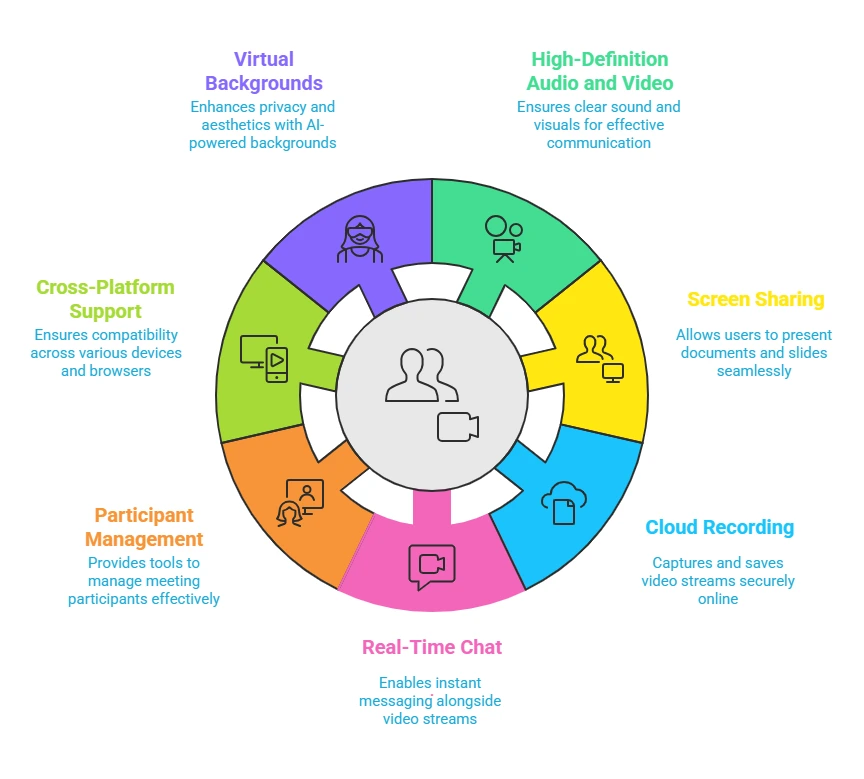
    • All-in-One Tools: Its main job is to smoothly connect all the important learning tools. This means video, audio, presentations, an interactive whiteboard, polls, and breakout rooms all exist on one virtual classroom platform. And that’s why you get back control and a smoother flow during your online sessions.
    • Supports Active Learning: It’s built to create active conversations, not just passive watching. The entire design supports active learning organized. This is a main benefit over just sending a pre-recorded video, as it allows for real-time questions and group work.

    What does a typical online class session look like?

    A typical session might start with the teacher greeting students as they join the live video conference. The teacher could then use a poll to ask a quick warm-up question. From there, they might share their screen to show a presentation, then switch to the interactive whiteboard to explain a key concept visually. For a group activity, the teacher can split the class into breakout rooms for a set amount of time. Finally, the class comes back together to share what they discussed before the session ends.

    Inside the Virtual Classroom: Features of a Good Virtual Classroom Software

    First img

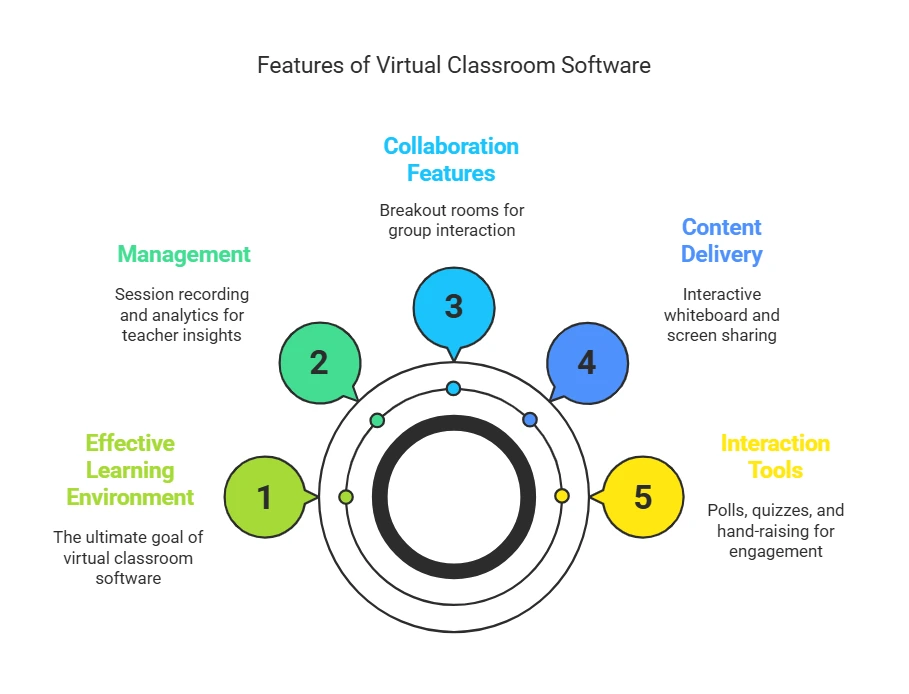
    Understanding the key Features of a good virtual classroom software shows how the system helps create a great learning environment. These are the most important, must-have features you should look for.

    • Interaction Tools (Polls, Quizzes, Hand-Raising): These are the tools that get students involved. Live polls and quizzes let you get instant feedback from the whole group, which helps get a quiet online class to participate. Plus, a virtual “hand-raise” feature provides an organized way for students to ask questions that doesn’t interrupt the class. This is how you can manage student participation effectively and keep the class flowing.
    • Content Delivery (Interactive Whiteboard & Screen Sharing): You keep hearing about an “interactive whiteboard” because it’s a game-changer for online teaching. It’s a shared digital canvas where you and your students can write, draw, and brainstorm together. It gives you back your ability to think visually and spontaneously, something many teachers miss. Again, screen sharing is still important for showing presentations, software, or documents.
    • Collaboration Features (Breakout Rooms): Real learning often happens in small groups. So, how do breakout rooms work? They let a teacher temporarily split the main class into smaller, private virtual rooms. This isn’t just a feature; it’s your best tool for fighting the quiet and lack of interest in a large online group. To use them in a real class, you can give each group a specific problem to solve or a topic to discuss for 5-10 minutes, then bring everyone back to share their ideas. This helps students work together and build personal connections.
    • Management (Session Recording & Analytics): Yes, you can record your classes. This is a crucial feature that offers great flexibility, letting students who can’t attend live catch up or others to review the material. In addition, the best platforms offer analytics that show you what’s going on. This means you can track attendance and participation, seeing who is engaged and who is falling behind before the exam, giving you the information you need to be a more effective teacher.

    Virtual Classroom vs. Standard Video Conferencing: A Clear Comparison

    For school leaders, understanding the difference between a purpose-built virtual classroom and a general video conferencing tool is key to making a smart investment. In fact, if you’ve ever felt like you’re fighting your software to teach a class, that frustration often comes from using the wrong tool for the job.

    Feature ComparisonVirtual Classroom PlatformStandard Video Conferencing
    Primary Use CaseTeaching, Training & Active LearningGeneral Communication & Meetings
    Teaching DesignHigh: Tools are made for how teachers teach and how students learn.Low: Tools are made for efficient meetings.
    Interactive WhiteboardAdvanced: Usually has tools for group work, templates, and saved work.Basic or None: Often has limited features, if any.
    Breakout RoomsMade for Teaching: Designed with teacher controls for watching and managing learning tasks.General: Designed for simple small-group chats.

    How to Choose the Right Online Learning Platform: A 5-Step Guide

    Image

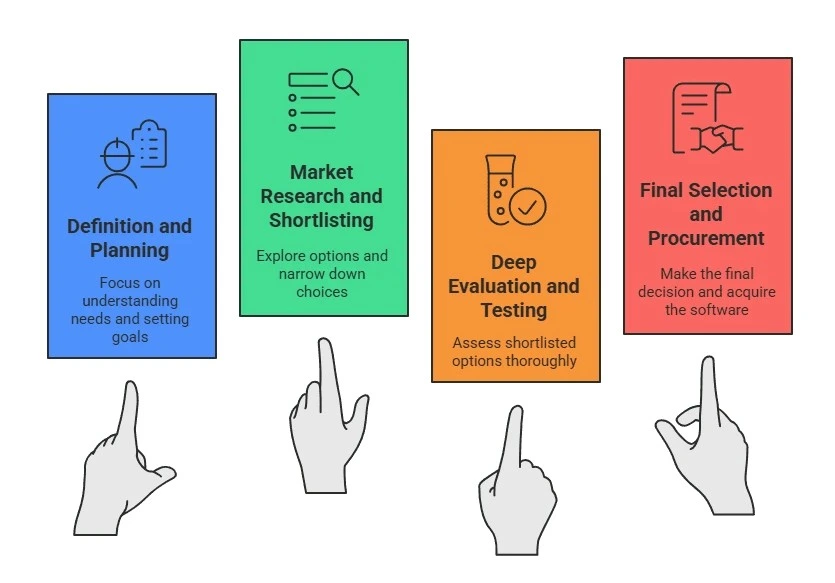
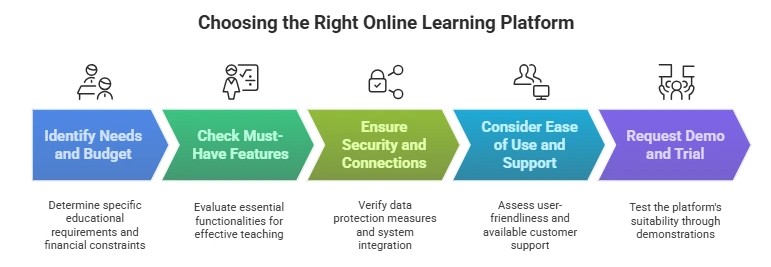
    For school leaders and decision-makers, picking the right technology is vital. Answering “How to choose the right online learning platform” requires a step-by-step plan to find the Best Online Education Platforms for your specific needs. This isn’t just about buying software; it’s about making a wise investment in your school’s future. Here’s a checklist you can use to compare platforms.

    Step 1: Know Your Needs and Budget Before you look at any platform, first look at your own school. The needs of a K-12 school are different from a corporate training department. A platform built for K-12 education will likely have simpler interfaces and stronger safety controls, while one for corporate training might focus more on tracking progress and results.

    You also need to think about cost. With the global education technology market expected to be a $404 billion industry by 2026, there is a vast range of options at different price points. How much does a good virtual classroom platform typically cost? Pricing models vary. Some charge per user, some per teacher, and others have flat-rate tiers. Be sure to ask about any hidden costs, like setup fees or charges for extra storage, so you can make an informed decision within this massive market.

    Step 2: Check the Must-Have Features Once you know your needs, move beyond the company’s marketing page. Make a checklist of features you absolutely need based on how your teachers actually teach. Don’t be impressed by a long list of features; focus on the ones that will actually be used to improve learning.

    Step 3: Look Closely at Security and Connections This is a must for any school and gives administrators peace of mind.

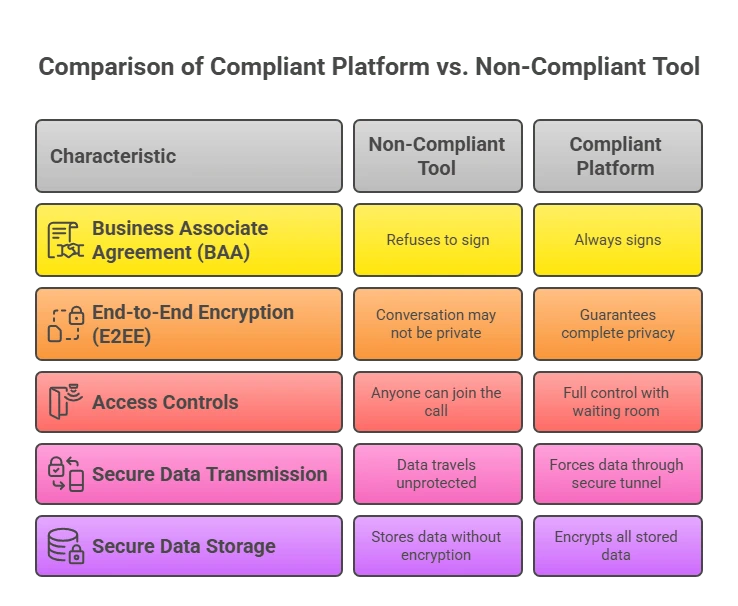
    • Security & Privacy: How is student and company data protected? The platform must follow data privacy rules like FERPA (a U.S. law protecting student records) and GDPR (Europe’s data protection law). Our advice is to ask companies for their compliance documents directly.
    • LMS Connection: Will this platform integrate with the other systems you already use? For everything to work smoothly, a good connection to your existing Learning Management System (LMS) is key. An LMS is the main hub for your online courses. There is still time to ensure the platform uses the latest industry standard, called LTI (Learning Tools Interoperability), which is a trusted way to connect different education tools securely.

    Step 4: Think About Ease of Use and Support: A powerful platform is useless if no one can figure it out. So, ask about what kind of customer support you can expect after you purchase. This will help you get achieve higher adoption and more effective use of the tool.

    Step 5: Ask for a Demo and Try It Out Never buy without trying. You should always ask, “Can I get a live demo or a free trial?” The best way to know if a platform is the right fit is to test it yourself. Pick your top choices and ask for live demos that show how they handle your most common teaching situations. This step prevents you from regretting a big purchase later.

    What to Do When Technical Problems Happen

    Even with the best platforms, technical issues can arise. What happens if there are problems during a class? It’s wise to have a simple backup plan. This could be as easy as having an asynchronous activity (like a discussion forum post) ready for students to complete if the live session is interrupted. For common issues like microphone or camera problems, having a simple, one-page troubleshooting guide for students and teachers can save a lot of time and frustration.

    Bringing it all Together: Introducing inClass

    Now that you understand what makes a virtual classroom effective and how to evaluate your options, it’s helpful to see what this looks like in a real platform. This is where a solution like inClass by InstaVC comes in.

    inClass is a cloud-based Software-as-a-Service (SaaS) virtual classroom platform designed to turn traditional classrooms into online spaces without limits. Nevertheless, it was created to solve the main challenges of online learning by offering a simple, secure, and collaborative place that focuses on high-quality video.

    It’s set up perfectly to meet the needs we’ve discussed:

    • A True Learning Space: The frustration of using clumsy, separate tools is why inClass is built for teaching. It combines features like assignments, content management, online tests, and progress reports into the platform. This creates one connected learning space and reduces the “tool fatigue” from switching between many different apps.
    • Simple and Accessible: Knowing that not every school has a big IT team, inClass is made for easy setup and management. It uses modern WebRTC technology, which lets video and audio work right in your web browser, so you don’t need to download anything. This makes it easier for everyone to get started.
    • Focus on Interaction: To get past boring online lectures, inClass gives you the tools you need for active participation and quick feedback, like an interactive whiteboard, polls, and chat.
    • Built by Video Experts: Even more than that, coming from PeopleLink and InstaVC, companies with a lot of experience in video technology, inClass is built to provide a high-quality, reliable video experience, which is the heart of any good live online class.

    For a school looking for a solution that fits between basic video calls and a complex LMS, a platform like inClass offers a great balance. It gives you the teaching tools you need in a system that’s easy to manage and secure.

    Conclusion: Moving Beyond the Basics

    A Virtual Classroom is much more than an online meeting; it’s a connected learning space made for effective teaching. It works by mixing communication tools with interactive teaching features to create organized, interesting, and collaborative learning experiences.

    Understanding this key idea, knowing what features to look for, and following a clear process to choose a platform are vital steps for any school or company. Please, with this clarity, you’re now in a better position to look at your current tools, see what’s missing, and make a smart choice that helps your teachers and benefits your learners.

    FAQ’s

    What exactly is a virtual classroom?

    A virtual classroom is an online learning environment that combines video conferencing with tools like interactive whiteboards and polling, creating an engaging and structured educational experience.

    How does a virtual classroom improve the online learning experience?

    This approach improves the experience by encouraging active participation instead of just watching. Interactive tools help students engage, and breakout rooms allow for teamwork. This setup helps teachers manage the class better and keeps students more involved than a regular video lecture.

    What are the must-have features in a good virtual classroom?

    The most important features to look for are a high-quality interactive whiteboard, easy-to-manage breakout rooms, live polling and quiz capabilities, and reliable session recording. These tools form the foundation of an engaging and effective online class.

    Can InstaVC virtual classrooms support group work or student collaboration?

    Yes, absolutely. Platforms like InstaVC’s inClass are designed to support collaboration. They provide features like breakout rooms for small-group discussions and interactive whiteboards where multiple users can brainstorm together, making group work a seamless part of the online learning process.

    How can I choose the right virtual classroom platform?

    To choose the right platform, follow these steps: First, figure out what you need and your budget. Next, look at the main teaching features of each platform, not just their ads. Then, check how secure they are and if they can connect with your current systems, like your learning management system (LMS). Finally, always ask for a live demo or trial to test the platform before making a decision.

  • How to transform Business with Video Conferencing Solutions

    How to transform Business with Video Conferencing Solutions

    As a business owner, John envisioned being able to connect with clients and employees around the world with the boundaries of geography being non existent. However, effective collaboration was always a challenge because of issues such as travel limitations, differing time zones, high communication costs, and misaligned schedules. But then he unlocked the full potential of his business when he learned about video conferencing solutions and their many benefits. Now, his team can collaborate in real time, meet clients virtually, and finalize deals without being restricted by geography.

    Businesses all over the globe are now using video conferencing platforms for the same reason John did. Efficient communication, boosted productivity, and enhanced organizational effectiveness have made these platforms must have business tools. With the increase in hybrid work culture, demand for secure video conferencing tools, and the need for businesses to stay competitive in the digital age, the right corporate video conferencing solution is more important than ever.

    This blog article focuses on highlighting the most critical features and benefits of using an AI Video Generator, along with key decision-making factors to help businesses choose the right solution for creating high-quality commercial and marketing videos.

    What is Video Conferencing Solutions   

    A video conferencing solution is a technology that enables real-time, face-to-face communication between participants in different locations through cloud-based video conferencing, dedicated software, or hardware setups. These solutions have transformed traditional business communication by offering advanced features that enhance collaboration and efficiency.

    With businesses transitioning to hybrid and remote work models, video conferencing platforms serve as the backbone for seamless communication. Whether used for internal team meetings, client interactions, training sessions, or large-scale webinars, they ensure connectivity and engagement, regardless of physical location. Research by Grand View also reports that the global market for video conferencing solutions is expected to reach around $14.56 billion by 2025, achieving 15% growth year on year.

    Key Features for Video Conferencing Platforms

    Selecting the right business video conferencing tool involves understanding its essential features. Here are the must-have elements for an effective video conferencing solution for businesses:

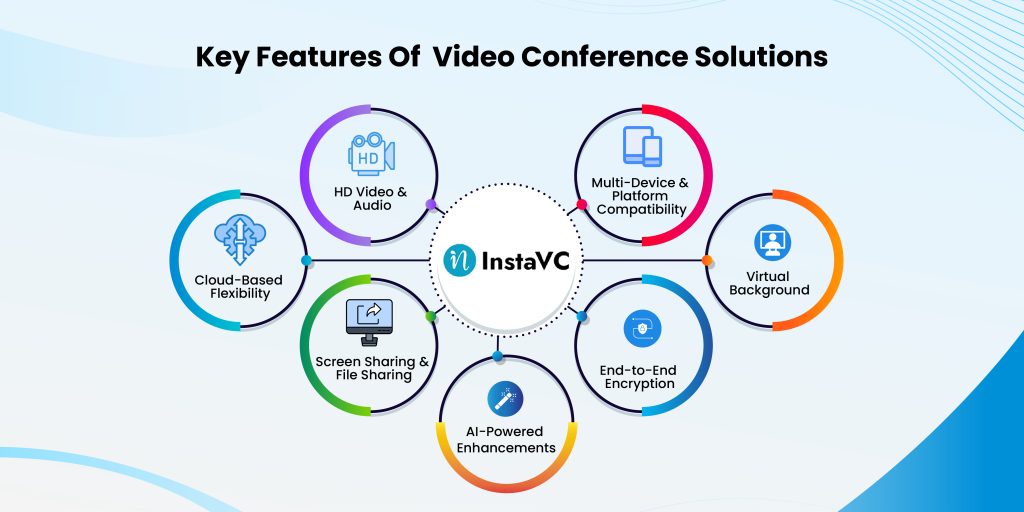
    Key Features of Video Conference Solutions
    1. HD Video & Audio: High-resolution video and crystal-clear audio ensure professional-grade communication.
    2. Cloud-Based Flexibility: Allows access from multiple devices, including desktops, tablets, and smartphones.
    3. Screen Sharing & File Sharing: Enables collaborative work and real-time document exchange.
    4. AI-Powered Enhancements: Includes smart transcription, automated captions, noise suppression, and speaker tracking.
    5. End-to-End Encryption: Ensures secure video conferencing by protecting sensitive business information.
    6. Virtual Backgrounds & Custom Layouts: Enhances professionalism and branding.
    7. Multi-Device & Platform Compatibility: Works across Windows, macOS, iOS, and Android devices

    Benefits of Professional AV Conferencing Equipment

    Increased Collaboration & Productivity

    Online meeting tools enable remote teams to connect effortlessly, ensuring effective brainstorming sessions, quick decision-making, and seamless information flow especially for chatgpt users who rely on AI-powered assistance to generate meeting notes, summarize discussions, and streamline communication.

    Cost Savings & Reduced Travel Expenses

    By replacing in-person meetings with virtual conferences, businesses can significantly reduce travel expenses, accommodation costs, and logistical expenses.

    Scalability for Enterprises & Startups

    From small businesses to large corporations, enterprise video solutions offer customizable options that grow with your business.

    Enhanced Customer Engagement

    Companies leverage video conferencing platforms for interactive client meetings, sales presentations, and virtual customer support, strengthening brand trust and relationships.

    Improved Security & Compliance

    Secure video conferencing solutions ensure privacy through encrypted connections, compliance with data regulations, and multi-factor authentication for enhanced security.

    Tips to Find Your Ideal Video Conferencing Software

    With numerous video conferencing platforms available, businesses must carefully evaluate their options. Here are essential tips for choosing the right solution:

    • Define Business Needs: Identify the primary use case—team collaboration, client meetings, or large-scale webinars.
    • Check Security Features: Look for end-to-end encryption, compliance certifications, and access control mechanisms.
    • Assess Compatibility & Integration: Ensure seamless integration with CRM, project management, and cloud storage solutions.
    • Review Pricing Plans: Compare different pricing models, including free, business, and enterprise subscriptions.
    • Evaluate User Experience: Choose a platform with an intuitive interface, easy setup, and 24/7 customer support.

    Where to use Secure Video Conferencing Software

    Businesses across various industries with a plethora of suite applications including inClass, inShop, inConsult, inApi, inMeet, inMeet Fusion, inClinic and inAffiliate. Stakeholders can utilize business video conferencing solutions to streamline operations.

    • Healthcare: Conducting telemedicine consultations and virtual diagnostics. Virtual clinic platforms enhance patient engagement through secure and efficient communication channels.
    • Education: Facilitating remote learning, online training sessions, and interactive virtual classroom solutions to support engaging and effective teaching methods.
    • Finance: Ensuring secure financial advisory meetings, investor relations discussions, and internal financial. Online consulting platforms help with strategy sessions with robust encryption and collaboration features.
    • Manufacturing: Performing virtual product inspections and coordinating with suppliers globally. Such digital workspace platforms help conduct efficient team meetings and streamline production processes.
    • Retail & Customer Support: Providing virtual product demonstrations and handling customer service interactions. Online shopping software creates immersive digital shopping experiences to enhance customer engagement and satisfaction.

    Future Trends in Video and Audio Conferencing

    The evolution of video conferencing solutions continues, with emerging technologies enhancing the user experience:

    1. AI-Powered Automation: Automated transcription, real-time language translation, and sentiment analysis for improved engagement.
    2. 5G & Edge Computing: Ultra-low latency connections for seamless 4K and 8K video streaming.
    3. Virtual & Augmented Reality (VR/AR): Immersive virtual collaboration spaces for interactive remote meetings.
    4. Advanced Security Features: AI-driven threat detection, biometric authentication, and blockchain-based data protection.

    Conclusion

    With remote work and digital interactions becoming the norm, businesses need robust video conferencing solutions to stay connected, productive, and secure. Whether for daily meetings, global collaborations, or virtual events, choosing the right video conferencing solution for businesses can drive efficiency and success.

    For enterprises looking for cloud-based video conferencing with top-tier security, seamless integrations, and AI-powered enhancements, InstaVC provides a leading-edge solution tailored to modern business needs. Embrace the future of communication with secure, scalable, and high-quality business video conferencing today!

    What are video conferencing solutions?

    Video conferencing solutions are software and hardware tools that enable remote teams and businesses to conduct virtual meetings, presentations, and collaborations in real-time.

    What is video conferencing and collaboration?

    Video conferencing refers to using digital platforms to conduct face-to-face meetings over the Internet, while collaboration involves additional features like file sharing, virtual whiteboards, and team chats.

    What is an example of a video conferencing platform?

    Popular examples include Zoom, Microsoft Teams, Google Meet, and InstaVC, which offers secure video conferencing with advanced enterprise features.

    What are the two main types of video conferencing systems?

    The two primary types are:

  • On-Premise Video Conferencing Systems: Hosted within a company’s infrastructure for enhanced security.
  • Cloud-Based Video Conferencing Solutions: Hosted on remote servers, offering flexibility and scalability.
  • 8 Important Facts About Video Conferencing You Need to Know

    8 Important Facts About Video Conferencing You Need to Know

    Imagine a world where geographical limitations pose no problem for working together. Healthcare professionals in New York can talk to patients in Tokyo without breaking a sweat, a CEO in London can interact with teams from all over the world in real-time, and a professor teaches students from different continents in real time as if they were in the same classroom. This kind of electronic communication is no longer a futuristic dream but the world we live in today, thanks to advanced video conferencing technologies.

    With the introduction of new technologies and globalization, everything has changed. Knowing these changes will ensure that you take full advantage of modern virtual collaboration as a business executive, educator, healthcare professional, or even a government official. This blog post covers eight core ideas related to the evolution of video conferencing and its effects in multiple fields.

    Table of Contents

    1. The Growth of Video Conferencing: Key Statistics
    2. 8 Important Facts of Modern Video Conferencing
    3. Common Video Conferencing Challenges and How to Fix Them
    4. Cloud-Based vs. On-Premises Video Conferencing Solutions: Pros and Cons
    5. Industry-Specific Applications of Video Conferencing
    6. Sustainability & Environmental Impact of Video Conferencing
    7. The Future of Video Conferencing
    8. Conclusion
    9. FAQs

    The Growth of Video Conferencing: Key Statistics

    Video conferencing is a key part of business functions, education, healthcare, and many more. The rapid adoption of this technology indicates the need for remote communication, collaboration, and efficiency enhancement solutions. As based on the survey by GrandView Research market research on video conferencing:

    • The universal video conferencing market is anticipated to grow at a 12.5% CAGR and be valued at USD 95 billion by 2030.
    • 87% of remote teams claim to be more connected because of video conferencing.
    • 76% of professionals think video meetings enhance productivity and engagement.
    • Companies save an average of 30% in travel costs when switching to virtual meetings.

    This evidence illustrates how video conferencing is gaining importance and becoming valuable. It shows how critical virtual meetings are for teachers, business people, and medical professionals around the globe.

    8 Important Facts of Modern Video Conferencing

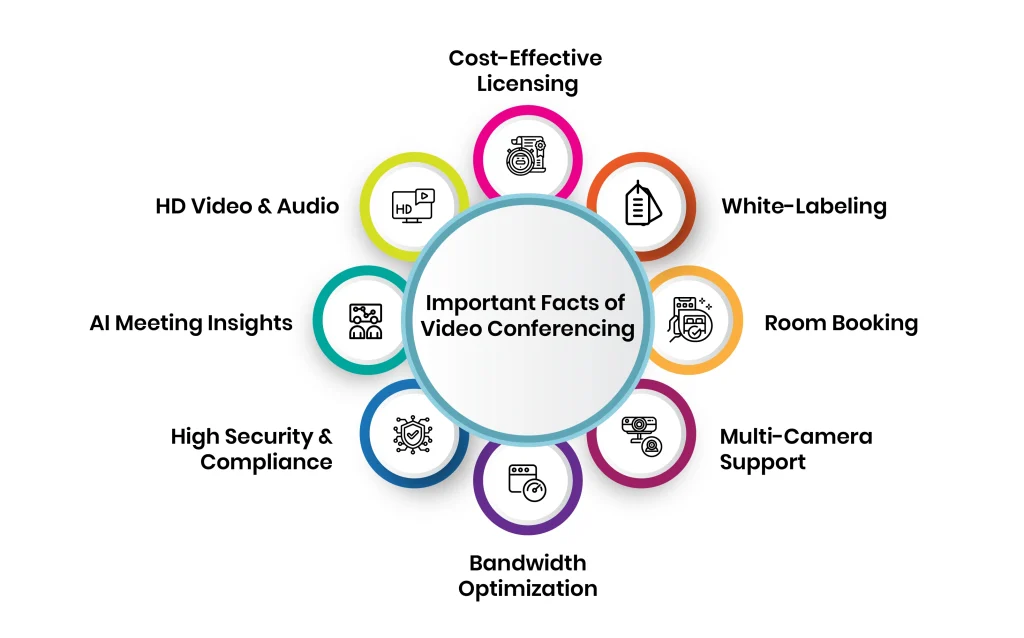
    1. Unmatched Video & Audio Quality

    The effectiveness of virtual meetings heavily depends on the quality of video and audio. Modern video conferencing platforms offer 4K Ultra HD resolution, ensuring clear visuals, while AI-powered noise cancellation eliminates background disturbances, allowing uninterrupted conversations.

    • 4K Ultra HD resolution for high-definition clarity.
    • AI-driven noise cancellation to eliminate distractions.
    • Multi-device and platform compatibility for seamless access.
    • Bandwidth optimization to ensure smooth calls even in low-network conditions.

    2. AI-Powered Meeting Summaries & Insights

    AI-assisted captioning, automation, productivity, and engagement reporting improve video conferencing efficiency alongside the use of AI tools provided by various technologies.

    • Real-time captioning and automated transcriptions for accessibility.
    • Meeting analytics for engagement and productivity tracking.

    AI programs and chatbots automatically create meeting engagement reports, real-time transcripts, and action items, improving collaborative work. Meeting action items are also AI-generated for efficient follow-up.

    3. Enterprise-Grade Security & Compliance

    Given that sensitive business discussions are taking place online, security should be given top priority. Advanced encryption technology combined with adherence to international data protection laws guarantee that sensitive conversations are secure.

    • End-to-end encryption for data protection.
    • Multi-factor authentication for secure access.
    • Compliance with HIPAA, GDPR, and other regulatory standards.
    • Role-based access control to prevent unauthorized access.

    4. Bandwidth Optimization for Seamless Connectivity

    A huge limitation of video conferencing is the network’s dependency. Most contemporary platforms employ adaptive bandwidth control, which modifies video quality depending on network speed, guaranteeing communication without interruptions.

    To further enhance the user experience, especially in recorded sessions, unlimited video editing can be used to polish footage, remove glitches, and maintain professional quality regardless of real-time connectivity issues.

    • Methods that increase efficiency in storing data.
    • Access from anywhere is possible due to the cloud system.
    • Control of call quality through adaptive bandwidth management.

    5. Multi-Camera Support & Hybrid Meeting Capabilities

    Solutions catering to a hybrid work setup should consider both physical and remote participants. Employees from anywhere can participate in multi-camera integrated features, making their experience engaging and enriching.

    • Multi-cam viewpoints for captivating digital presentations.  
    • Seamless collaboration through hybrid meeting room integration.  
    • AI-powered framing, along with speaker tracking, allows for a professional setup.

    6. Smart Scheduling & Room Booking

    Scheduling or managing virtual meetings can take much time. Smart scheduling tools embedded within business calendars can save time.

    • Integrated with Google Calendar, Outlook, and other enterprise applications.
    • AI scheduling without conflicts.
    • Reminders, notifications, and alerts for meetings are automated.

    7. Custom Branding & White-Labeling

    A cohesive brand experience is necessary on all platforms, including video conferencing tools. Custom branding guarantees uniformity in professional interactions.

    • Transformable user interface with specified images and styles.
    • Personalized virtual meeting rooms with specific domain names.
    • Enterprise and service provider white labeling.

    8. Scalable & Cost-Effective Licensing

    Keeping an open mind matters to scalability – this applies at every level of the company. The development of flexible licensed conferencing options improves productivity at every level of the business.

    • Cost-effectiveness can be maximized through simultaneous sitting licensing.
    • Custom business pricing is needed.
    • Prices are determined by demand.

    Common Video Conferencing Challenges and How to Fix Them

    Network Reliance and Bandwidth Challenges 

    One problem that participants in video conferencing encounter is relaying information, which depends mainly on the availability of a stable internet connection. Some of the consequences of bandwidth issues include lags, pixelated visuals, bad audio quality, and even getting frequently disconnected, which affects productivity and interferes with the flow of meetings.

    Reasons for Bandwidth Related Issues:

    • Irregular Internet Connection: Network bandwidth that varies affects video quality.
    • Packet and Latency Issues: Data transmission can be delayed, thus causing misalignment of video and audio coupled with screenshots.
    • Heavy Network Traffic: Multiple users on the same server face the challenge of bandwidth congestion.

    Recommendations:

    • Network Structure Enhancement: Conferencing can be enhanced with high-speed broadband internet or even a dedicated internet link.
    • Background Application Restriction: Limit the background processes that are data intensive and use all available bandwidth while giving preference to video conferencing.
    • Automatic Adjustment of Video Quality: When network traffic and congestion are high, features that lower video quality can be activated.
    • Using Wire Link: The internet’s stability is higher when using Ethernet cables than when using Wi-Fi networks.

    Data Breach and Other Security-Related Issues

    The use of videoconferencing aids communication in business settings while at the same time posing cybersecurity risks, including, but not limited to, identity theft, data leakage, and hacking. Sensitive business conversations, delicate healthcare consultations, and classroom activities are bound to cybercrime and need to be protected.

    Possible Cyber Security Threats

    • Unwanted visitors: They breach meetings and interfere with the activity.
    • Data Interception: Unauthenticated communication can be captured by hackers.
    • Weak Access Controls: Mismanaged passwords combined with poorly controlled public meeting links pose security issues.

    Solutions:

    • End-To-End Encryption: Guarantees secure data transmission.
    • Multi-Factor Authentication (MFA): Provides an additional security feature other than passwords.
    • Controlled Access: Utilize password-protected meetings, waiting rooms, and role-based permission access.
    • Regular Software Updates: Conferencing tools should be updated regularly to fix security risk issues.

    Video Fatigue and Engagement Strategies 

    People might experience video fatigue during lengthy virtual meetings. This leads to mental exhaustion, a lack of focus, and a general loss of interest in participating in a meeting.

    Causes of Video Fatigue:
    Lack of Physical Movement
    : Surrounded by the natural aspect of sitting on your chair for long duration of time.
    Excessive Eye Contact: Continuous face-to-face interaction can be suffocating.
    Multitasking Pressure: The expectation that one needs to be actively engaged on camera always.

    Solutions:

    • Shorter, Well-Structured Meetings: Set a well-defined agenda and keep meetings brief.
    • Encourage Audio-Only Break: Implement methods that allow the camera to be turned off from time to time.
    • Engagement Tools: To sustain interest, incorporate quizzes, question-and-answer sessions, breakout sessions, and interactive whiteboards.
    • Flexible Meeting Formats: Use asynchronous communications for discussions that don’t have an immediate urgency.

    Cloud-Based vs. On-Premise Video Conferencing Solutions: Pros and Cons

    When implementing a video conferencing solution, organizations must choose between cloud-based and on-premises deployments. Each model offers unique advantages and challenges:

    FeatureCloud-Based Video ConferencingOn-Premise Video Conferencing
    Setup & MaintenanceNo complex hardware installation, updates managed by service providerRequires dedicated IT team for maintenance and upgrades
    ScalabilityEasily scalable for growing businessesLimited by in-house infrastructure capacity
    Security & ComplianceData stored on third-party servers, reliant on provider’s security measuresFull control over data security, ideal for highly regulated industries
    CostSubscription-based model, lower upfront costsHigh initial investment but long-term cost savings
    Performance & ReliabilityDependent on internet connectivityWorks even with limited external network dependency

    Industry-Specific Applications of Video Conferencing

    Enterprise: Driving Global Collaboration

    Modern enterprises rely on video conferencing to enhance teamwork, connect distributed teams, and facilitate decision-making without geographical constraints.This is especially critical for organizations investing in ecommerce software development, where cross-border tech teams, marketing departments, and operations units must stay aligned in real time.

    • Virtual brainstorming sessions and remote strategy meetings.
    • Board meetings with international stakeholders.
    • Real-time document sharing and cross-functional team collaboration.

    Healthcare: Virtual Patient Care & Telemedicine

    Telemedicine is revolutionizing healthcare by providing remote patient care and consultations, making medical expertise accessible worldwide.

    • Secure telehealth consultations and remote diagnostics.
    • Virtual patient monitoring and second opinions from specialists.
    • Medical training and real-time surgical guidance.

    Education: Enabling Hybrid & Virtual Learning

    Education institutions leverage video conferencing for interactive learning, virtual classrooms, and faculty collaboration.

    • Virtual classrooms with AI-powered learning tools.
    • Remote faculty collaboration and guest lectures.
    • Student engagement tracking for enhanced learning experiences.

    Government & Public Services

    Governments use video conferencing for secure internal discussions, virtual policy-making, and public service accessibility.

    • Secure high-level meetings with encrypted communication.
    • Virtual town halls to engage with citizens.
    • Online public service accessibility for efficiency.

    Finance & Legal Sectors

    Security and compliance are critical in finance and legal sectors, where video conferencing enables secure transactions and legal consultations.

    • Video KYC verification for client authentication.
    • Remote legal proceedings and court hearings.
    • Confidential client meetings with encrypted data protection.

    Sustainability & Environmental Impact of Video Conferencing

    Minimizing Business Travel Saves Carbon Footprint
    When contemplating the negative effects of video conferencing, one of the most pertinent is the carbon emissions ticketed by business travel. In the past, professionals were used to meeting via planes, long car rides, or even train trips, and these modes of transportation added a great deal of carbon to their organization’s carbon footprint. Now, with the shift to virtual meetings, businesses can:

    • Reduce Emissions: Not having to travel for meetings frequently means less CO₂ emissions produced from flying and driving.
    • Consume Less Energy: Remote collaboration caters to not needing energy from hotels, larger conference centers, and transport hubs.
    • Increase Cost Savings: There is less traveling now, which equates to lower operational costs and spending that can be put back into sustainable causes.

    Not only does this have a positive impact on the environment, but it also increases workplace focus and productivity while enhancing work-life dynamics by reducing time wasted on traveling.

    Green Computing and Energy Efficient Conferencing

    Solutions Aside from reducing the time spent on traveling, video conferencing solutions are becoming more environmentally friendly and energy efficient. The major features modern solutions are adopting include:

    • Bandwidth Optimization: Newer platforms actively compress video streams, which decreases the amount of power used to transmit data.
    • Cloud Scalability: The cloud infrastructure assigns resources that can provide power without depending on hardware, thus eliminating the need for power consumption.
    • Eco-Friendly Components: The low-power-consuming components allow sustainable usage, and these devices were designed to make a plethora of video conferencing devices.

    With more firms adopting sustainability principles, selecting energy-saving video conferencing tools is furthering minimizing their ecological impact.

    The Future of Video Conferencing

    As businesses, educational institutions, health care systems, and government agencies continue to adapt to computer-mediated communication, innovation in these technologies will remain central to improving user experience, productivity, and data protection.

    The use of immersive technologies such as augmented and virtual reality (AR) will transform remote working meetings by making them more interactive and captivating. As these trends continue to unfold, video conferencing is likely to be undertaken without any interruptions, and enhanced intelligence and robust cyber security will make remote working as efficient and effortless as face-to-face meetings.

    Highlights:

    • AI-supported automation for effortless meeting handling.
    • AR and VR technologies for enhanced interaction experiences.
    • Integration of blockchain technology for security purposes and maintaining the fidelity of information.
    • The application of edge computing and 5G technology for dependably quick video conferencing.

    Conclusion

    Refreshing your video conferencing setup is not only a pursuit but can also greatly change your organization’s functionality. With InstaVC, you’re not simply acquiring a single tool; instead, you’re preparing your organization for the advancement of communication technology. Watch in amazement how our solutions transform your virtual meetings and push your business forward.

    Ready to revolutionize your virtual meetings? Discover how next-gen video conferencing can elevate your business. Schedule a Free Demo with InstaVC Now!

    FAQ’s

    What do you mean by video conferencing?

    Video conferencing involves the integration of audiovisual technology to facilitate two-way communication between people located in diverse areas. Video conferencing technology has gained popularity with the advent of remote meetings using virtual meeting apps, e-learning, telemedicine, and collaborative developments.

    What is an example of a video conferencing?

    Zoom is a prime example of video conferencing technology that enables users to host virtual meetings, webinars, and share screens. Other known service providers include Microsoft Teams, Google Meet and Cisco Webex, which are frequently utilized for both casual and business communication.

    Who uses video conferencing?

    Companies, educators, practitioners of medicine, officials, and the general public utilize video conferencing for empowerment meetings, digital classrooms, tele-medicine, and group work, which makes video conferencing a necessity in contemporary communication.

    What are the advantages of video conferencing?

    Video conferencing enhances communication by fostering face-to-face conversations from any part of the world and also supports reduced travel expenses, increased overall productivity, better collaboration, and greater flexibility.

    What are the five elements required for video conferencing?

    Effective video conferencing requires a camera, microphone, display, speakers, and reliable internet connection for effective communication to take place in clear audio and video quality.

  • InstaVC Wins the Winter 2025 Top Performer Award from SourceForge

    InstaVC Wins the Winter 2025 Top Performer Award from SourceForge

    InstaVC is proud to be a winner of the Top Performer award from SourceForge, the world’s largest software reviews and comparison website.

    19th February, 2025– InstaVC, a pioneer in video conferencing and business collaboration, announced today that it has been awarded the Winter 2025 Top Performer Award by SourceForge, the world’s largest software review and comparison website. This award recognizes exceptional companies and products with a high volume of recent excellent user reviews that puts them in the top tenth percentile of highly reviewed products on SourceForge.

    We’re happy to announce this year’s outstanding Winter 2025 Top Performers. InstaVC showed that they are loved by their users, as evidenced by their large amount of outstanding user reviews.

    – SourceForge President, Logan Abbott

    To win the Winter 2025 Top Performer award, each award recipient had to receive enough high-rated user reviews to place the winning product in the top 10% of favorably reviewed products out of the 100,000 products on SourceForge, which demonstrates the utmost quality that InstaVC delivers to customers.

    At InstaVC, we’re excited to accept the SourceForge Winter 2025 Top Performer Award. We do our best to provide a best-in-class product, and we’re happy to see our users rewarding us with good reviews. We’re honored to be valued by our customers and to be recognized by SourceForge

    – CEO of InstaVC, Amit Chowdry

    About SourceForge

    SourceForge.net is the world’s largest software comparison directory, serving nearly 20 million users every month and featuring user reviews, product comparisons, software guides, and more. SourceForge’s mission is to help businesses find the best software to fit their needs and their budget. There are a variety of software tools available to businesses, and there are tools in almost every category and niche, each serving a slightly different purpose.

    About InstaVC

    InstaVC Inc., based in California, United States, is a leading cloud-based video collaboration provider that offers 4K-ready video meeting applications. For 15+ years of credibility and trust we provide an ultimate productive virtual meeting experience. InstaVC Inc. has been recognized and won the Prestigious Times Business Award for the Best Cloud Solution “InstaVC Collaboration Suite”. The company takes pride in boasting the most exceptional workforce in the market. Our team of 500+ dedicated professionals stands as a testament to unparalleled dedication, expertise, and passion, driving our company’s success to new heights.

    Contact: 📲 +𝟗𝟏 𝟕𝟎𝟑𝟐𝟑𝟐𝟒𝟒𝟒𝟖 | ✉️ 𝐯𝐜@𝐢𝐧𝐬𝐭𝐚𝐯𝐜.𝐜𝐨𝐦 | 🌐 𝐰𝐰𝐰.𝐢𝐧𝐬𝐭𝐚𝐯𝐜.𝐜𝐨𝐦

    Free Demo: https://www.instavc.com/contact-sales

    Follow Us: LinkedIn | Facebook | Instagram | Twitter | YouTube

  • A Must-have Video Collaboration Solution for Insurance Companies!

    A Must-have Video Collaboration Solution for Insurance Companies!

    The Insurance sector is one of the most important industries in the world, and it’s essential that it continues to function smoothly. That’s why virtual collaboration is so important – it allows Insurance Companies to work together more efficiently and share information more easily.

    In this article, we’ll discuss some of the benefits of video collaboration for the Insurance Companies and explain how it can help you streamline your work and make better decisions. Ready to take advantage of digital collaboration? Let’s get started!

    The Insurance vertical is one of the most technologically advanced in the world. From wire transfers to automated transactions, the sector is constantly expanding its use of technology to save time and improve efficiency. However, the Pandemic made the Industry realize how important it is to have a secured video collaboration software embedded in their systems for effortlessly on-boarding new clientele or executing transactional meetings with the existing ones, including the KYC procedure, which requires in-person communication & certain explicit details collecting which was impossible at that time.

    What benefits do cloud collaborations have for the Insurance industry?

    The effectiveness and productivity of Insurance services teams can be significantly improved by the implementation of cloud collaboration software. With the aid of the appropriate cloud collaboration solution, insurance institutions can maximize the productivity of their employees through powerful automation that simplifies processes and repetitive chores.

    Multi-Location Meetings

    Maintaining communication between several branches of an Insurance institution is difficult. A quick and efficient video conferencing system enables management and staff in many locations to connect virtually while also reducing travel and other operating costs.

    Such a real-world setting is provided by InstaVC Collaboration Software, allowing personnel to share data and information in order to preserve the same standards and practices throughout branches.

    A few of the main advantages of implementing our cloud collaboration solution for your Insurance institutions are listed below:

    Increasing client satisfaction:

    The pace of change in customer expectations is alarming. Insurance institutions must keep ahead of the curve to meet and exceed client expectations, or they are at risk of falling behind the competition. For example, consumers today expect quick services for loan applications, mortgage servicing, new insurance policies, or account administration.

    They can considerably increase the pace of service by implementing InstaVC collaborative software that is intended for quicker and easier communication.

    Driving increased productivity and efficiency

    InstaVC cloud collaboration application is more versatile than just improving online conversations. Businesses may greatly simplify their workflows and boost team productivity by implementing the proper technology. Whereas email used to be the preferred method of communication for teams in the Insurance industry, firms today have access to this extravagant platform that allows for immediate collaboration and offers a more visible, accessible context to assist teams provide better customer care.