Category: InstaVC

  • Video Conferencing Software: The Complete Guide for Businesses  

    Video Conferencing Software: The Complete Guide for Businesses  

    Video conferencing software enables people to communicate through live video and audio over the internet without being in the same physical location. Businesses, educational institutions, healthcare organizations, government agencies, and other organizations use video conferencing platforms for meetings, customer communication, training, webinars, remote collaboration, consultations, interviews, and virtual events.

    Modern video conferencing software goes beyond basic video calls. Today’s platforms can provide HD video and audio, screen sharing, meeting recording, chat, virtual collaboration, security controls, analytics, integrations, APIs, and flexible deployment options.

    This guide explains what video conferencing software is, how it works, the different types available, important features, security considerations, cloud and on-premise deployment, and how organizations can choose the right video conferencing solution.

    What Is Video Conferencing Software?

    Video conferencing software is a digital communication solution that allows two or more people to communicate using real-time video and audio over the internet or a private network.

    Depending on the platform, users can join meetings through a web browser, desktop application, mobile application, meeting room system, or integrated business application.

    A modern video conferencing platform may combine:

    • Video communication
    • Audio communication
    • Screen sharing
    • Meeting recording
    • Chat
    • File sharing
    • Digital whiteboards
    • Collaboration tools
    • Meeting analytics
    • Security controls
    • APIs and SDKs
    • Business integrations

    Video conferencing software is commonly used for:

    • Business meetings
    • Remote and hybrid work
    • Customer meetings
    • Online training
    • Webinars
    • Interviews
    • Healthcare consultations
    • Online education
    • Government communication
    • Virtual events
    • Multi-location collaboration

    The right solution depends on an organization’s users, meeting requirements, security policies, infrastructure, integrations, scalability, and budget.

    How Does Video Conferencing Software Work?

    Video conferencing software captures audio and video from a user’s microphone and camera, processes the media, and delivers it to other participants through a network.

    A simplified video conferencing workflow is:

    Camera and Microphone → Audio/Video Processing → Network → Conferencing Infrastructure → Participants

    Browser-based video communication can use technologies such as WebRTC to support real-time audio and video communication.

    The underlying system can involve codecs, signaling, media servers, networking infrastructure, security mechanisms, and bandwidth management.

    1. User Authentication

    The participant signs into the platform or joins a meeting using a meeting link, authentication method, or organizational identity system.

    2. Meeting Connection

    The platform establishes the meeting session and determines how participants should connect to the conferencing infrastructure.

    3. Audio and Video Capture

    The camera captures video while the microphone captures audio. The software processes these streams before transmission.

    4. Media Transmission

    Audio and video streams are transmitted through the network to the conferencing infrastructure and other participants.

    5. Real-Time Processing

    The platform manages video quality, audio processing, bandwidth, latency, noise reduction, and other factors affecting meeting quality.

    6. Collaboration

    Participants can share screens, documents, presentations, chat messages, whiteboards, and other content depending on the platform.

    Organizations building or evaluating real-time communication systems can also refer to the W3C WebRTC specification for information about browser-based real-time communication capabilities.

    Types of Video Conferencing Software

    Organizations can choose from several types of video conferencing solutions depending on their infrastructure and business requirements.

    Cloud-Based Video Conferencing

    Cloud video conferencing software is hosted by the service provider. Organizations typically access the platform through a browser or application without managing the underlying conferencing infrastructure.

    Best suited for:

    • Remote teams
    • Small and medium businesses
    • Distributed organizations
    • Organizations seeking rapid deployment
    • Companies that prefer managed infrastructure

    Advantages include:

    • Faster deployment
    • Easier scalability
    • Lower infrastructure management
    • Access from multiple locations
    • Provider-managed maintenance

    On-Premise Video Conferencing

    On-premise video conferencing software is deployed within an organization’s own infrastructure or private environment.

    Best suited for:

    • Enterprises with strict security requirements
    • Government organizations
    • Healthcare institutions
    • Organizations with data-control requirements
    • Businesses with existing private infrastructure

    On-premise deployment can provide greater control over infrastructure, network policies, data management, system configuration, and integration.

    Hybrid Video Conferencing

    Hybrid video conferencing combines cloud and private infrastructure.

    This approach can be useful for organizations that want the flexibility of cloud services while retaining control over selected workloads, users, data, or infrastructure.

    Industry-Specific Video Conferencing

    Some organizations require more than general-purpose meetings.

    Healthcare, education, government, retail, financial services, and other industries may require specialized workflows, integrations, compliance controls, or user experiences.

    Industry-specific video conferencing software can be designed around these requirements.

    Embedded Video Conferencing and Video APIs

    Video APIs and SDKs allow organizations and software developers to integrate real-time video communication into their own applications, websites, portals, and workflows.

    This approach is useful when video communication needs to become part of an existing digital product rather than operating as a separate meeting application.

    Key Features of Video Conferencing Software

    When comparing video conferencing platforms, organizations should evaluate both meeting features and the underlying technology.

    HD Video and Audio

    High-quality video and audio are fundamental to a productive meeting experience.

    Look for support for:

    • HD video
    • High-quality audio
    • Adaptive video quality
    • Noise reduction
    • Echo cancellation
    • Automatic gain control
    • Bandwidth optimization

    Screen Sharing

    Screen sharing allows participants to present applications, documents, dashboards, websites, presentations, and other digital content.

    Meeting Recording

    Recording allows organizations to preserve meetings for later viewing, training, documentation, or organizational requirements.

    Chat and Collaboration

    Meeting chat enables participants to exchange messages, links, files, and other information without leaving the meeting environment.

    Virtual Backgrounds

    Virtual backgrounds can help users maintain privacy or create a more professional meeting environment.

    Breakout Rooms

    Breakout rooms allow a larger meeting to be divided into smaller sessions. They are particularly useful for training, education, workshops, and collaborative activities.

    Digital Whiteboarding

    Digital whiteboards allow participants to brainstorm, explain concepts, and collaborate visually.

    Meeting Analytics

    Enterprise video conferencing platforms may provide information about meetings, participants, usage, quality, and organizational activity.

    Integrations

    Video conferencing software can integrate with:

    • Calendar systems
    • CRM platforms
    • Learning management systems
    • Productivity applications
    • Communication platforms
    • Identity providers
    • Business applications

    APIs and SDKs

    Organizations that need embedded communication can use APIs and SDKs to integrate video functionality into their own applications.

    Benefits of Video Conferencing Software

    Supports Remote and Hybrid Work

    Video conferencing enables employees and teams to communicate regardless of their physical location.

    Reduces Business Travel

    Organizations can conduct meetings, consultations, training sessions, and presentations remotely, reducing the need for travel.

    Improves Collaboration

    Teams can combine video, audio, screen sharing, messaging, and collaborative tools within one communication environment.

    Expands Customer Reach

    Businesses can communicate with customers, partners, and prospects across different locations without requiring physical meetings.

    Enables Industry-Specific Communication

    Video conferencing can support workflows in education, healthcare, government, retail, and other sectors.

    Supports Business Continuity

    Organizations can continue communication when employees cannot work from a common physical location.

    Cloud vs On-Premise Video Conferencing

    Choosing between cloud and on-premise deployment depends on an organization’s infrastructure, security, scalability, and operational requirements.

    FactorCloudOn-Premise
    DeploymentFasterRequires infrastructure
    Infrastructure controlLowerHigher
    ScalabilityGenerally easierDepends on infrastructure
    MaintenanceProvider-managedOrganization-managed
    CustomizationPlatform-dependentGreater control
    Data controlProvider environmentOrganization-controlled
    Best suited forFast deployment and scalabilityHigh-control environments

    There is no universally correct deployment model. Organizations should select the approach that fits their technical, operational, security, and compliance requirements.

    How Secure Is Video Conferencing Software?

    Security should be one of the primary considerations when selecting an enterprise video conferencing platform.

    Organizations should evaluate:

    • Encryption
    • Secure authentication
    • Role-based access
    • Meeting passwords
    • Waiting rooms
    • Participant controls
    • Data protection
    • Single sign-on
    • Audit logs
    • Administrative controls
    • Data retention policies
    • Network security
    • API security

    Organizations working with real-time communication technologies should also consider relevant networking and communication standards. The IETF publishes technical standards and specifications covering many internet communication technologies.

    Security requirements vary between industries. Healthcare, government, financial services, and other regulated environments may require additional controls.

    How to Choose the Right Video Conferencing Software

    Choosing a video conferencing platform should begin with business requirements rather than a feature checklist alone.

    Step 1: Identify Your Users

    Determine who will use the platform:

    • Employees
    • Customers
    • Students
    • Teachers
    • Doctors
    • Patients
    • Government officials
    • Partners
    • Developers

    Step 2: Define Meeting Requirements

    Consider:

    • Number of participants
    • Meeting duration
    • Meeting frequency
    • Recording requirements
    • Screen sharing
    • Breakout sessions
    • Webinars
    • Large events
    • Meeting room requirements

    Step 3: Evaluate Deployment

    Decide whether your organization requires:

    • Cloud
    • On-premise
    • Hybrid
    • Embedded video

    Step 4: Evaluate Security

    Review authentication, access controls, encryption, administration, data management, and other security requirements.

    Step 5: Check Integrations

    Make sure the platform can connect with the business applications your organization already uses.

    Step 6: Evaluate Scalability

    The platform should support current requirements while allowing you to add users, meetings, locations, and applications as your organization grows.

    Step 7: Consider Total Cost

    Don’t evaluate software only by its subscription price.

    Consider:

    • Licensing
    • Infrastructure
    • Implementation
    • Maintenance
    • Training
    • Integrations
    • Support
    • Hardware
    • Network requirements

    Video Conferencing Software for Different Industries

    Different industries have different communication requirements.

    Business and Enterprise

    Businesses use video conferencing for internal meetings, sales presentations, customer communication, interviews, training, and hybrid work.

    Enterprise environments may additionally require SSO, centralized administration, analytics, APIs, integrations, and advanced security controls.

    Education

    Educational institutions can use video conferencing for:

    • Virtual classrooms
    • Remote lectures
    • Faculty meetings
    • Online training
    • Student collaboration
    • Parent-teacher meetings
    • Distance learning

    Education-focused platforms may also need attendance management, classroom controls, recording, and learning system integrations.

    Healthcare

    Healthcare organizations can use video communication for:

    • Virtual consultations
    • Remote specialist communication
    • Patient follow-ups
    • Medical collaboration
    • Telehealth workflows

    Healthcare deployments should consider privacy, security, authentication, data handling, and integration requirements.

    Government

    Government organizations may require highly controlled communication environments for meetings, consultations, remote offices, and interdepartmental collaboration.

    Important considerations can include security, access control, infrastructure control, data management, and deployment flexibility.

    Retail

    Retail organizations can use video communication for:

    • Store-to-head-office communication
    • Customer consultations
    • Employee training
    • Remote assistance
    • Multi-location collaboration

    InstaVC Video Conferencing Solutions

    InstaVC provides video communication solutions designed for different business and industry requirements.

    Its solution portfolio includes video meeting, collaboration, communication, education, healthcare, retail, and video API capabilities.

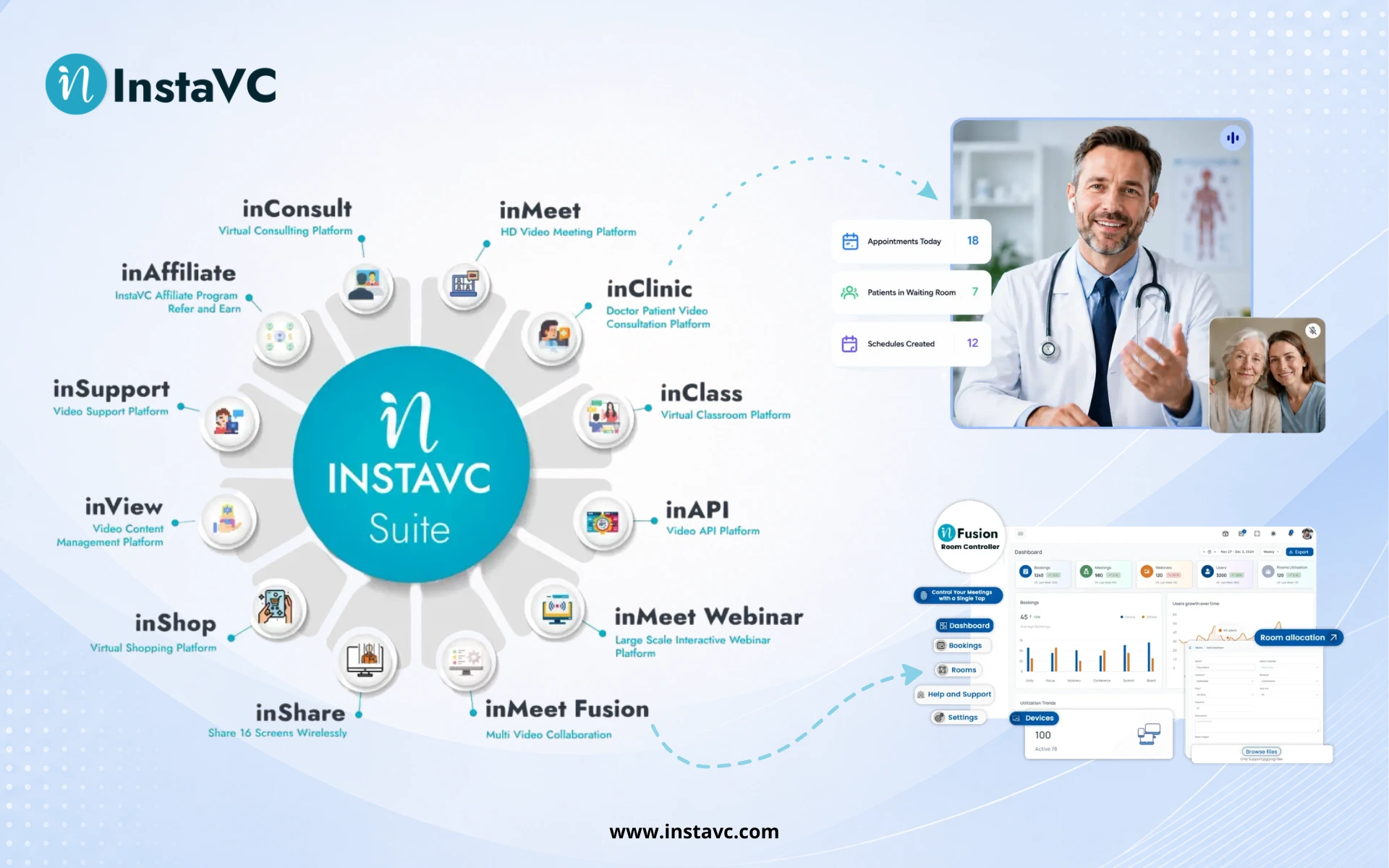
    inMeet

    inMeet is designed for online video meetings and collaboration, supporting organizations that need virtual meetings and remote communication.

    Want to see this in action? Book a personalized demo.

    inFusion

    InstaVC’s collaboration capabilities can support organizations looking to combine video communication with broader collaboration workflows.

    Want to see this in action? Book a personalized demo.

    inClass

    Education-focused video communication can support virtual classrooms, remote learning, online teaching, and educational collaboration.

    Related: classroom management software for modern education

    inClinic

    Healthcare-focused video communication can support virtual healthcare interactions and remote consultations.

    Need help implementing this strategy in your workplace? Reach out to our experts.

    inShop

    Retail-oriented video communication can support communication between customers, stores, teams, and remote experts.

    Related: virtual shopping platform: the complete guide

    inLynk

    inLynk can support communication and collaboration requirements across organizational environments.

    inAPI

    Organizations that want to add video communication to their own applications can explore video API capabilities for embedded communication and application integration.

    Related: why use a video API? A complete guide

    Video Conferencing Software vs Video Meeting Software

    The terms video conferencing software and video meeting software are often used interchangeably, but they can describe slightly different scopes.

    Video meeting software generally focuses on conducting online meetings.

    Video conferencing software can refer to a broader communication platform that includes meetings along with collaboration, recording, administration, integrations, APIs, analytics, room systems, and industry-specific capabilities.

    For organizations, the important consideration is not the terminology but whether the platform provides the capabilities required for their communication workflows.

    Video Conferencing Software vs Traditional Meetings

    Traditional in-person meetings require participants to be physically present in the same location.

    Video conferencing allows participants to communicate remotely while seeing and hearing each other in real time.

    RequirementTraditional MeetingVideo Conferencing
    Physical presenceRequiredNot required
    TravelOften requiredUsually not required
    Remote participationLimitedBuilt in
    Screen sharingAdditional equipmentUsually available
    RecordingAdditional setupOften built in
    Multi-location meetingsMore difficultEasier
    ScalabilityLocation-dependentNetwork/platform-dependent

    Video conferencing does not completely replace face-to-face communication. Instead, it provides organizations with another way to communicate when physical meetings are impractical or unnecessary.

    What Should Businesses Look for in Video Conferencing Software?

    Modern businesses should evaluate video conferencing software based on more than basic video calling.

    Key areas include:

    • AI-assisted meeting capabilities
    • Intelligent noise reduction
    • Automated transcription
    • Meeting summaries
    • Advanced analytics
    • Secure authentication
    • API and SDK availability
    • Cloud and on-premise deployment
    • Hybrid work support
    • Interoperability
    • Integration capabilities
    • Accessibility
    • Scalability
    • Enterprise administration

    AI features should complement the meeting experience rather than replace the fundamentals of reliable video, audio, security, and usability.

    Frequently Asked Questions

    FAQ
    What is video conferencing software?

    Video conferencing software allows people in different locations to communicate using real-time video and audio over the internet or a private network. Modern platforms may also provide screen sharing, recording, messaging, collaboration, security, analytics, and integrations.

    What is the best video conferencing software for businesses?

    The best solution depends on the organization’s requirements. Businesses should evaluate participant capacity, video and audio quality, security, integrations, deployment options, administration, scalability, and total cost before selecting a platform.

    What features should video conferencing software have?

    Important features include HD video and audio, screen sharing, recording, chat, collaboration, meeting controls, security, administration, integrations, analytics, and API capabilities.

    Is cloud or on-premise video conferencing better?

    Neither option is universally better. Cloud platforms can simplify deployment and scalability, while on-premise platforms can provide greater infrastructure and data control. The right choice depends on organizational requirements.

    Is video conferencing secure?

    Video conferencing can be secure when the platform and organization implement appropriate authentication, access controls, encryption, administrative policies, and data protection measures.

    Can video conferencing be integrated into other applications?

    Yes. Video APIs and SDKs can allow organizations to integrate real-time video communication into websites, applications, portals, healthcare systems, education platforms, and other software products.

    Can video conferencing support hybrid work?

    Yes. Video conferencing is one of the core technologies used by hybrid organizations to connect employees working from offices, homes, meeting rooms, and other locations.

    What is the difference between video conferencing and video calling?

    Video calling generally describes a direct video communication session between individuals or small groups. Video conferencing usually refers to a broader meeting environment supporting multiple participants and collaboration capabilities.

  • The Complete Guide to Video Conferencing Integration in 3 Proven Paths

    The Complete Guide to Video Conferencing Integration in 3 Proven Paths

    Imagine for a moment that you are working in a physical office. You are sitting at your desk, and you need to ask a colleague a quick question. In the physical world, you would simply turn your chair around and speak. It is seamless. It is instant. You do not have to leave the building, walk down the street, enter a different building, and sign in at a front desk just to say hello.

    Now, think about how we work online today. You are typing in a chat application. You decide you need to talk face-to-face. Often, this means you have to leave that application, open a completely different piece of software like Zoom or Teams, schedule a meeting, copy a link, go back to the chat, paste the link, and wait for the other person to click it. It feels like leaving your office building just to have a conversation.

    This is where the concept of integrating video conferencing into your digital ecosystem comes in. When we talk about a “digital ecosystem,” we are simply referring to the collection of different computer programs and apps your company uses every day. This includes your email, your calendar, your chat tools, and the software you use to manage customer information. Integrating video conferencing means connecting your video tools to these other apps so they talk to each other. It effectively knocks down the walls between your digital rooms, allowing you to move from typing to talking as easily as turning your chair around in a physical office.

    Table of Contents

    Why Integrate Video Conferencing Within Your Company’s Digital Ecosystem

    You might be wondering why this effort is necessary. After all, opening a separate video app only takes a few seconds. While those seconds seem small on their own, they add up to a massive amount of lost time and focus when you multiply them across every employee and every day of the year.

    The primary reason to integrate is to eliminate what experts call context switching. Context switching happens when your brain has to stop one task and shift gears to manage a different tool. Every time you have to minimize a window to open a video app, your brain loses its train of thought. By integrating video directly into the tools you are already using, you preserve your focus. You stay in the flow of your work.

    Another major reason is data accuracy. When your video tools are separate, information gets lost. If you have a video meeting with a client, you often have to manually type notes into your customer database afterwards. If you forget, that information is gone forever. When you integrate these systems, the computer can do this work for you. It can automatically log that a meeting happened, record how long it lasted, and even save the recording directly into the client’s file without you lifting a finger.

    3 Implementation Paths to Video Conferencing Integration

    There is no single way to achieve this. Depending on your budget, your technical skills, and your goals, you can choose from three distinct paths. We will look at these paths ranging from the easiest method to the most highly customized method.

    Path 1: The “Connector” Strategy (Low Effort, High Speed)

    The first path is what we call the Connector Strategy. This is the best place to start because it usually requires no technical skills whatsoever. This strategy relies on pre-built connections that software companies have already created for you.

    In the software world, many of the tools you use every day already have these “plugs” ready to go. A common example is the integration between team chat apps like Slack and video tools. You can install a small add-on that lets you type a simple command in a chat channel to instantly start a video call. The video window pops up right there, or gives a one-click link for everyone in that channel.

    This path is low effort because the hard work has already been done by the software vendors. It is high speed because you can usually set it up in minutes. You simply go to the settings menu of your favorite app, look for a section called “Integrations” or “Apps,” and search for your video conferencing provider. Once you click “Connect” and sign in, the two systems begin working together.

    Path 2: The “Automation” Strategy (No-Code/Low-Code)

    The second path is the Automation Strategy. For this path, you use “No-Code” or “Low-Code” automation tools. These are special platforms that act like a digital middleman or a universal translator. The most famous examples are tools like Zapier or Make. You do not need to know how to write computer code to use them, but you do need to think a little bit logically.

    In this strategy, you set up “triggers” and “actions.” A trigger is the event that starts the process. An action is what happens next.

    For example, you could tell the automation tool that the “trigger” is a new appointment being booked on your calendar. You then set the “action” to create a Zoom meeting link. You can then add a second “action” to email that link to the customer. You can even add a third “action” to send a message to your team’s chat channel saying a new meeting has been booked.

    This strategy is powerful because it removes human error. You no longer have to remember to copy and paste links or send reminder emails. The robot does it for you every single time. It is called “No-Code” because you are usually building these workflows by dragging and dropping blocks on a screen rather than typing programming language. It requires a bit more effort than Path 1 because you have to design the workflow, but it gives you superpowers in how your team manages their time.

    Path 3: The “Embedded” Strategy (High Effort, High Customization)

    The third path is the Embedded Strategy. This is the most advanced method, but it is also the most rewarding. This is where you stop using other people’s apps and instead build video capabilities directly into your own website or mobile application.

    In this path, you are making video a native part of your own software. That’s why this path requires high effort because you need software developers to write the code and maintain it.

    To achieve this, your developers use a technology called an API (Application Programming Interface). In the software world, you might have heard this acronym before. It stands for Application Programming Interface.

    An API is essentially a set of code instructions provided by a video company (like inAPI) that your developers can copy and paste into your own software. These instructions allow your website to borrow the powerful video technology from the provider while keeping your own look and feel.

    This strategy gives you total control. When you use a standard app like Zoom or Teams, you have to accept their layout, their colors, and their logos. With the Embedded Strategy, you design the screen exactly how you want it.

    This is the standard approach used by modern telehealth apps. When a patient needs to see a doctor, they do not want to download a generic app and figure out how to use it. They log into the hospital’s secure portal, click on the “Start Consultation,” button, and the doctor appears on the screen. The patient never has to download a new app or create a separate login. The video is simply a feature of the website they are already using.

    With three different paths available, it can be overwhelming to decide which one to choose. The good news is that you do not have to choose just one forever. You can evolve through them as your needs change. Here is a simple way to help you decide where to start.

    Start with Path 1

    You should almost always start with Path 1. It is the “low hanging fruit.” Look at the tools your team uses every single day. Check your email provider, whether it is Microsoft Outlook or Google Gmail. Check your Customer Relationship Management (CRM) system if you have one. Check your team chat app.

    Go into the settings of these applications and see if they have a “one-click” integration for video. If they do, turn them on immediately. There is very little downside to this. It costs nothing in terms of development time, and it immediately solves the problem of having to open multiple tabs just to start a meeting. If your team is small and you just need to talk to each other efficiently, Path 1 might be all you ever need.

    Move to Path 2

    You should move to Path 2 if you start noticing repetitive manual work. Pay attention to how your team spends their day. Are they manually copying and pasting the same email invitation text five times a day? Are they manually downloading a video recording from the cloud and then uploading it to a folder in their project management software Identifying these repetitive tasks can help you decide when it’s time to automate workflows and improve overall efficiency.

    These are signs that the basic connectors from Path 1 are not enough. If you find your team acting like robots—doing the same simple task over and over again—it is time to look at a tool like Zapier or Make. This is also the right path if you need to connect two tools that are not very popular and therefore do not have a pre-built integration.

    Reserve Path 3

    You should reserve Path 3 for a very specific scenario. This path is usually not for internal team meetings. It is for when you are interacting with your customers.

    If you are building a product or a service where the customer experience is everything, sending them to a generic “Zoom link” can feel unprofessional. It breaks the immersion. Imagine you are a luxury jewelry brand. You have a beautiful website. If a customer wants to see a diamond, and you send them a generic link that asks them to download software, the magic is broken.

    In this case, you want the video to happen right there on your website. You want the colors to match your brand. You want the experience to be seamless. This is when you hire developers to use an API and embed the video. It costs more money and time to build, but it adds massive value to your brand.

    Vendor Landscape and Selection Guide

    Now that you understand the paths, you need to know who provides the technology. The world of video software is vast, but for the purpose of integration, we can divide the vendors into three main categories.

    7.1 SaaS Platforms

    The first group is the most familiar SaaS providers. SaaS stands for Software as a Service. These are the companies that sell ready-made video applications that you subscribe to, usually on a monthly basis.

    The most famous names here are inMeet, Zoom, Microsoft Teams, and Google Meet. These platforms are excellent at what they do. They are reliable, millions of people know how to use them, and they are packed with features. If you want a standard meeting experience, they are perfect. If you want to build something unique, they can be limiting.

    7.2 Programmable Video Providers (CPaaS)

    The second group is less famous to the general public but incredibly powerful for businesses. We call them Programmable Video Providers or CPaaS. This stands for Communications Platform as a Service.

    These providers are the engine behind the Embedded Strategy we discussed in Path 3. Instead of selling you a finished video application that you just log into, they sell the raw technology that powers video calling. They provide the code and the server infrastructure that your developers use to build video directly into your own website or mobile app.

    Providers like inAPI are particularly notable in this space because they focus on making these building blocks secure and easy to use. inAPI is often the invisible force behind the platform you see.

    If you have ever used eSanjeevani to consult a doctor online, you didn’t download a “Zoom” or “Teams” app. You simply logged into the government portal, clicked a button, and the doctor appeared on your screen. That seamless experience was powered by the same technology that drives inAPI.

    7.3 Integration Middleware (iPaaS)

    The final group of vendors does not provide the video itself, but they provide the glue that holds everything together. We call them Integration Middleware or iPaaS. This stands for Integration Platform as a Service.

    These are the companies we mentioned in Path 2, such as Zapier, MuleSoft, or Make. They do not host your video calls. Instead, they sit in the middle between your video provider (like Zoom) and your other tools (like your email).

    These vendors are essential if you are taking the Automation Strategy. When selecting a vendor in this category, you want to look at how many “connectors” they have. A tool like Zapier connects to thousands of different apps. This increases the chances that they can talk to the specific software your company uses. You also want to look at how easy they are to use. Some are designed for complete beginners with visual drag-and-drop interfaces, while others are more complex and meant for IT professionals.

    Making Digital Communication Feel Natural

    Integrating video conferencing into your digital ecosystem is not just a technical task. it is a way to respect your employees’ and customers’ time. Whether you start by simply flipping a switch in your calendar app or embark on a journey to build a fully custom video platform for your website, the goal remains the same. You are trying to make communication as natural and immediate as turning your chair around to talk to a colleague. By understanding these paths and the vendors available, you can build a digital workplace that flows smoothly, allowing your team to focus on their work rather than on the tools they use to do it.

    Ready to Take the Next Step?

    If your team is exploring embedded or API-based video integration, inAPI provides developer-friendly tools to get started quickly.

    FAQs

    FAQ
    What is video conferencing integration in a digital ecosystem?

    It connects your video tools with other apps like email and chat so they work together seamlessly. This lets you start calls instantly without switching between different programs or copying links manually.

    Why should companies integrate video conferencing into their digital ecosystem?

    Integration saves time by stopping employees from constantly switching contexts to open separate video apps. It also improves data accuracy by automatically logging meeting details and recordings directly into your business systems.

    Which business systems can be integrated with video conferencing platforms?

    You can connect almost any tool your team uses daily, including email clients, calendars, and team chat applications. It is also very common to integrate video into Customer Relationship Management (CRM) systems and healthcare portals.

    How do APIs enable video conferencing integration?

    APIs act like a digital messenger that allows your custom software to “borrow” a video provider’s technology. They let developers build video features directly into your own website or app without needing to build the technology from scratch.

    What are the steps to integrate video conferencing within a company’s digital ecosystem?

    Start by checking if your current apps have pre-built “one-click” video connectors and turn them on. If you need more customization, use automation tools to connect apps or hire developers to embed video using an API.

    Is video conferencing integration secure for enterprises?

    Yes, reputable providers use strong encryption to ensure your conversations cannot be spied on by outsiders. When using an API or connector from a trusted vendor, your data remains protected and compliant with safety standards.

  • How to transform Business with Video Conferencing Solutions

    How to transform Business with Video Conferencing Solutions

    As a business owner, John envisioned being able to connect with clients and employees around the world with the boundaries of geography being non existent. However, effective collaboration was always a challenge because of issues such as travel limitations, differing time zones, high communication costs, and misaligned schedules. But then he unlocked the full potential of his business when he learned about video conferencing solutions and their many benefits. Now, his team can collaborate in real time, meet clients virtually, and finalize deals without being restricted by geography.

    Businesses all over the globe are now using video conferencing platforms for the same reason John did. Efficient communication, boosted productivity, and enhanced organizational effectiveness have made these platforms must have business tools. With the increase in hybrid work culture, demand for secure video conferencing tools, and the need for businesses to stay competitive in the digital age, the right corporate video conferencing solution is more important than ever.

    This blog article focuses on highlighting the most critical features and benefits of using an AI Video Generator, along with key decision-making factors to help businesses choose the right solution for creating high-quality commercial and marketing videos.

    What is Video Conferencing Solutions   

    A video conferencing solution is a technology that enables real-time, face-to-face communication between participants in different locations through cloud-based video conferencing, dedicated software, or hardware setups. These solutions have transformed traditional business communication by offering advanced features that enhance collaboration and efficiency.

    With businesses transitioning to hybrid and remote work models, video conferencing platforms serve as the backbone for seamless communication. Whether used for internal team meetings, client interactions, training sessions, or large-scale webinars, they ensure connectivity and engagement, regardless of physical location. Research by Grand View also reports that the global market for video conferencing solutions is expected to reach around $14.56 billion by 2025, achieving 15% growth year on year.

    Key Features for Video Conferencing Platforms

    Selecting the right business video conferencing tool involves understanding its essential features. Here are the must-have elements for an effective video conferencing solution for businesses:

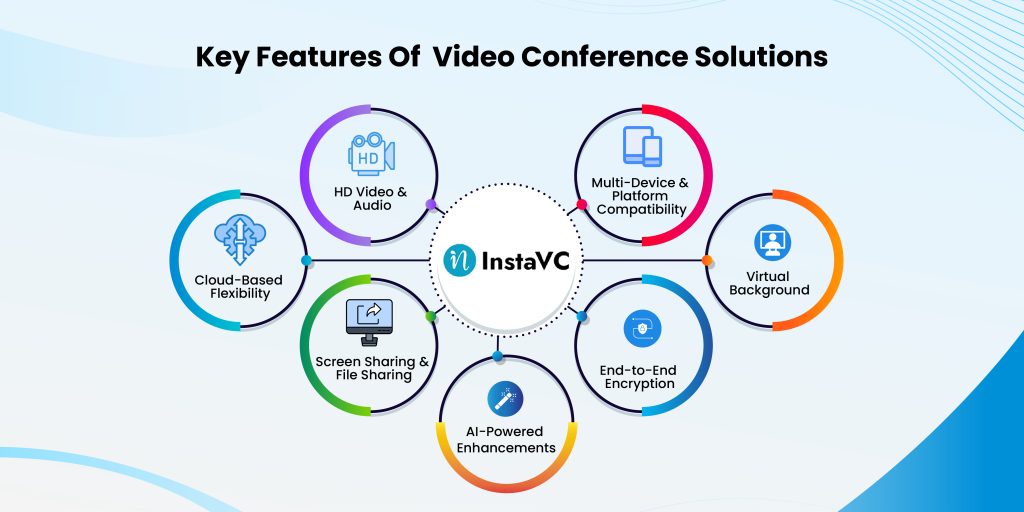
    Key Features of Video Conference Solutions
    1. HD Video & Audio: High-resolution video and crystal-clear audio ensure professional-grade communication.
    2. Cloud-Based Flexibility: Allows access from multiple devices, including desktops, tablets, and smartphones.
    3. Screen Sharing & File Sharing: Enables collaborative work and real-time document exchange.
    4. AI-Powered Enhancements: Includes smart transcription, automated captions, noise suppression, and speaker tracking.
    5. End-to-End Encryption: Ensures secure video conferencing by protecting sensitive business information.
    6. Virtual Backgrounds & Custom Layouts: Enhances professionalism and branding.
    7. Multi-Device & Platform Compatibility: Works across Windows, macOS, iOS, and Android devices

    Benefits of Professional AV Conferencing Equipment

    Increased Collaboration & Productivity

    Online meeting tools enable remote teams to connect effortlessly, ensuring effective brainstorming sessions, quick decision-making, and seamless information flow especially for chatgpt users who rely on AI-powered assistance to generate meeting notes, summarize discussions, and streamline communication.

    Cost Savings & Reduced Travel Expenses

    By replacing in-person meetings with virtual conferences, businesses can significantly reduce travel expenses, accommodation costs, and logistical expenses.

    Scalability for Enterprises & Startups

    From small businesses to large corporations, enterprise video solutions offer customizable options that grow with your business.

    Enhanced Customer Engagement

    Companies leverage video conferencing platforms for interactive client meetings, sales presentations, and virtual customer support, strengthening brand trust and relationships.

    Improved Security & Compliance

    Secure video conferencing solutions ensure privacy through encrypted connections, compliance with data regulations, and multi-factor authentication for enhanced security.

    Tips to Find Your Ideal Video Conferencing Software

    With numerous video conferencing platforms available, businesses must carefully evaluate their options. Here are essential tips for choosing the right solution:

    • Define Business Needs: Identify the primary use case—team collaboration, client meetings, or large-scale webinars.
    • Check Security Features: Look for end-to-end encryption, compliance certifications, and access control mechanisms.
    • Assess Compatibility & Integration: Ensure seamless integration with CRM, project management, and cloud storage solutions. Businesses should also consider compatibility with other digital solutions, such as ecommerce software development, to create a more connected and efficient technology ecosystem.
    • Review Pricing Plans: Compare different pricing models, including free, business, and enterprise subscriptions.
    • Evaluate User Experience: Choose a platform with an intuitive interface, easy setup, and 24/7 customer support.

    Where to use Secure Video Conferencing Software

    Businesses across various industries with a plethora of suite applications including inClass, inShop, inConsult, inApi, inMeet, inMeet Fusion, inClinic and inAffiliate. Stakeholders can utilize business video conferencing solutions to streamline operations.

    • Healthcare: Conducting telemedicine consultations and virtual diagnostics. Virtual clinic platforms enhance patient engagement through secure and efficient communication channels.
    • Education: Facilitating remote learning, online training sessions, and interactive virtual classroom solutions to support engaging and effective teaching methods.
    • Finance: Ensuring secure financial advisory meetings, investor relations discussions, and internal financial. Online consulting platforms help with strategy sessions with robust encryption and collaboration features.
    • Manufacturing: Performing virtual product inspections and coordinating with suppliers globally. Such digital workspace platforms help conduct efficient team meetings and streamline production processes.
    • Retail & Customer Support: Providing virtual product demonstrations and handling customer service interactions. Online shopping software creates immersive digital shopping experiences to enhance customer engagement and satisfaction.

    Future Trends in Video and Audio Conferencing

    The evolution of video conferencing solutions continues, with emerging technologies enhancing the user experience:

    1. AI-Powered Automation: Automated transcription, real-time language translation, and sentiment analysis for improved engagement.
    2. 5G & Edge Computing: Ultra-low latency connections for seamless 4K and 8K video streaming.
    3. Virtual & Augmented Reality (VR/AR): Immersive virtual collaboration spaces for interactive remote meetings.
    4. Advanced Security Features: AI-driven threat detection, biometric authentication, and blockchain-based data protection.

    Conclusion

    With remote work and digital interactions becoming the norm, businesses need robust video conferencing solutions to stay connected, productive, and secure. Whether for daily meetings, global collaborations, or virtual events, choosing the right video conferencing solution for businesses can drive efficiency and success.

    For enterprises looking for cloud-based video conferencing with top-tier security, seamless integrations, and AI-powered enhancements, InstaVC provides a leading-edge solution tailored to modern business needs. Embrace the future of communication with secure, scalable, and high-quality business video conferencing today!

    What are video conferencing solutions?

    Video conferencing solutions are software and hardware tools that enable remote teams and businesses to conduct virtual meetings, presentations, and collaborations in real-time.

    What is video conferencing and collaboration?

    Video conferencing refers to using digital platforms to conduct face-to-face meetings over the Internet, while collaboration involves additional features like file sharing, virtual whiteboards, and team chats.

    What is an example of a video conferencing platform?

    Popular examples include Zoom, Microsoft Teams, Google Meet, and InstaVC, which offers secure video conferencing with advanced enterprise features.

    What are the two main types of video conferencing systems?

    The two primary types are:

  • On-Premise Video Conferencing Systems: Hosted within a company’s infrastructure for enhanced security.
  • Cloud-Based Video Conferencing Solutions: Hosted on remote servers, offering flexibility and scalability.
  • 8 Important Facts About Video Conferencing You Need to Know

    8 Important Facts About Video Conferencing You Need to Know

    Imagine a world where geographical limitations pose no problem for working together. Healthcare professionals in New York can talk to patients in Tokyo without breaking a sweat, a CEO in London can interact with teams from all over the world in real-time, and a professor teaches students from different continents in real time as if they were in the same classroom. This kind of electronic communication is no longer a futuristic dream but the world we live in today, thanks to advanced video conferencing technologies.

    With the introduction of new technologies and globalization, everything has changed. Knowing these changes will ensure that you take full advantage of modern virtual collaboration as a business executive, educator, healthcare professional, or even a government official. This blog post covers eight core ideas related to the evolution of video conferencing and its effects in multiple fields.

    Table of Contents

    1. The Growth of Video Conferencing: Key Statistics
    2. 8 Important Facts of Modern Video Conferencing
    3. Common Video Conferencing Challenges and How to Fix Them
    4. Cloud-Based vs. On-Premises Video Conferencing Solutions: Pros and Cons
    5. Industry-Specific Applications of Video Conferencing
    6. Sustainability & Environmental Impact of Video Conferencing
    7. The Future of Video Conferencing
    8. Conclusion
    9. FAQs

    The Growth of Video Conferencing: Key Statistics

    Video conferencing is a key part of business functions, education, healthcare, and many more. The rapid adoption of this technology indicates the need for remote communication, collaboration, and efficiency enhancement solutions. As based on the survey by GrandView Research market research on video conferencing:

    • The universal video conferencing market is anticipated to grow at a 12.5% CAGR and be valued at USD 95 billion by 2030.
    • 87% of remote teams claim to be more connected because of video conferencing.
    • 76% of professionals think video meetings enhance productivity and engagement.
    • Companies save an average of 30% in travel costs when switching to virtual meetings.

    This evidence illustrates how video conferencing is gaining importance and becoming valuable. It shows how critical virtual meetings are for teachers, business people, and medical professionals around the globe.

    8 Important Facts of Modern Video Conferencing

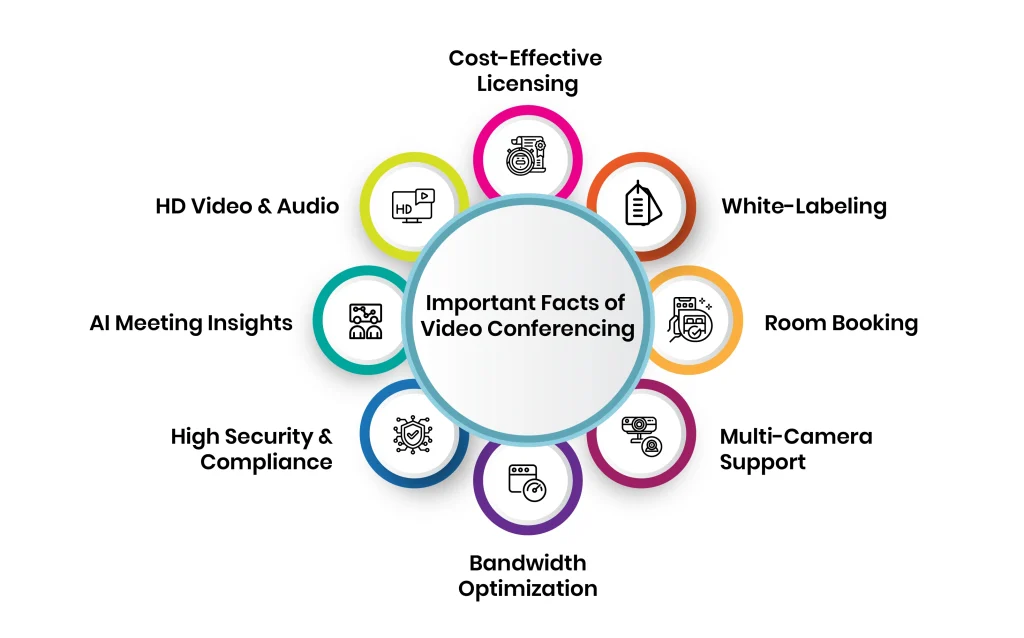
    1. Unmatched Video & Audio Quality

    The effectiveness of virtual meetings heavily depends on the quality of video and audio. Modern video conferencing platforms offer 4K Ultra HD resolution, ensuring clear visuals, while AI-powered noise cancellation eliminates background disturbances, allowing uninterrupted conversations.

    • 4K Ultra HD resolution for high-definition clarity.
    • AI-driven noise cancellation to eliminate distractions.
    • Multi-device and platform compatibility for seamless access.
    • Bandwidth optimization to ensure smooth calls even in low-network conditions.

    2. AI-Powered Meeting Summaries & Insights

    AI-assisted captioning, automation, productivity, and engagement reporting improve video conferencing efficiency alongside the use of AI tools provided by various technologies.

    • Real-time captioning and automated transcriptions for accessibility.
    • Meeting analytics for engagement and productivity tracking.

    AI programs and chatbots automatically create meeting engagement reports, real-time transcripts, and action items, improving collaborative work. Meeting action items are also AI-generated for efficient follow-up.

    3. Enterprise-Grade Security & Compliance

    Given that sensitive business discussions are taking place online, security should be given top priority. Advanced encryption technology combined with adherence to international data protection laws guarantee that sensitive conversations are secure.

    • End-to-end encryption for data protection.
    • Multi-factor authentication for secure access.
    • Compliance with HIPAA, GDPR, and other regulatory standards.
    • Role-based access control to prevent unauthorized access.

    4. Bandwidth Optimization for Seamless Connectivity

    A huge limitation of video conferencing is the network’s dependency. Most contemporary platforms employ adaptive bandwidth control, which modifies video quality depending on network speed, guaranteeing communication without interruptions.

    To further enhance the user experience, especially in recorded sessions, unlimited video editing can be used to polish footage, remove glitches, and maintain professional quality regardless of real-time connectivity issues.

    • Methods that increase efficiency in storing data.
    • Access from anywhere is possible due to the cloud system.
    • Control of call quality through adaptive bandwidth management.

    5. Multi-Camera Support & Hybrid Meeting Capabilities

    Solutions catering to a hybrid work setup should consider both physical and remote participants. Employees from anywhere can participate in multi-camera integrated features, making their experience engaging and enriching.

    • Multi-cam viewpoints for captivating digital presentations.  
    • Seamless collaboration through hybrid meeting room integration.  
    • AI-powered framing, along with speaker tracking, allows for a professional setup.

    6. Smart Scheduling & Room Booking

    Scheduling or managing virtual meetings can take much time. Smart scheduling tools embedded within business calendars can save time.

    • Integrated with Google Calendar, Outlook, and other enterprise applications.
    • AI scheduling without conflicts.
    • Reminders, notifications, and alerts for meetings are automated.

    7. Custom Branding & White-Labeling

    A cohesive brand experience is necessary on all platforms, including video conferencing tools. Custom branding guarantees uniformity in professional interactions.

    • Transformable user interface with specified images and styles.
    • Personalized virtual meeting rooms with specific domain names.
    • Enterprise and service provider white labeling.

    8. AI Video Technology in Content Creation

    Video conferencing uses AI for better meetings, and the same AI technology now helps create content for marketing and social media.

    • Businesses use AI tools to automate video production and editing.
    • An AI ad maker helps create ad visuals from video clips automatically.
    • Teams repurpose meeting recordings into marketing content with AI.

    9. Scalable & Cost-Effective Licensing

    Keeping an open mind matters to scalability – this applies at every level of the company. The development of flexible licensed conferencing options improves productivity at every level of the business.

    • Cost-effectiveness can be maximized through simultaneous sitting licensing.
    • Custom business pricing is needed.
    • Prices are determined by demand.

    Common Video Conferencing Challenges and How to Fix Them

    Network Reliance and Bandwidth Challenges 

    One problem that participants in video conferencing encounter is relaying information, which depends mainly on the availability of a stable internet connection. Some of the consequences of bandwidth issues include lags, pixelated visuals, bad audio quality, and even getting frequently disconnected, which affects productivity and interferes with the flow of meetings.

    Reasons for Bandwidth Related Issues:

    • Irregular Internet Connection: Network bandwidth that varies affects video quality.
    • Packet and Latency Issues: Data transmission can be delayed, thus causing misalignment of video and audio coupled with screenshots.
    • Heavy Network Traffic: Multiple users on the same server face the challenge of bandwidth congestion.

    Recommendations:

    • Network Structure Enhancement: Conferencing can be enhanced with high-speed broadband internet or even a dedicated internet link.
    • Background Application Restriction: Limit the background processes that are data intensive and use all available bandwidth while giving preference to video conferencing.
    • Automatic Adjustment of Video Quality: When network traffic and congestion are high, features that lower video quality can be activated.
    • Using Wire Link: The internet’s stability is higher when using Ethernet cables than when using Wi-Fi networks.

    Data Breach and Other Security-Related Issues

    The use of videoconferencing aids communication in business settings while at the same time posing cybersecurity risks, including, but not limited to, identity theft, data leakage, and hacking. Sensitive business conversations, delicate healthcare consultations, and classroom activities are bound to cybercrime and need to be protected.

    Possible Cyber Security Threats

    • Unwanted visitors: They breach meetings and interfere with the activity.
    • Data Interception: Unauthenticated communication can be captured by hackers.
    • Weak Access Controls: Mismanaged passwords combined with poorly controlled public meeting links pose security issues.

    Solutions:

    • End-To-End Encryption: Guarantees secure data transmission.
    • Multi-Factor Authentication (MFA): Provides an additional security feature other than passwords.
    • Controlled Access: Utilize password-protected meetings, waiting rooms, and role-based permission access.
    • Regular Software Updates: Conferencing tools should be updated regularly to fix security risk issues.

    Video Fatigue and Engagement Strategies 

    People might experience video fatigue during lengthy virtual meetings. This leads to mental exhaustion, a lack of focus, and a general loss of interest in participating in a meeting.

    Causes of Video Fatigue:
    Lack of Physical Movement
    : Surrounded by the natural aspect of sitting on your chair for long duration of time.
    Excessive Eye Contact: Continuous face-to-face interaction can be suffocating.
    Multitasking Pressure: The expectation that one needs to be actively engaged on camera always.

    Solutions:

    • Shorter, Well-Structured Meetings: Set a well-defined agenda and keep meetings brief.
    • Encourage Audio-Only Break: Implement methods that allow the camera to be turned off from time to time.
    • Engagement Tools: To sustain interest, incorporate quizzes, question-and-answer sessions, breakout sessions, and interactive whiteboards.
    • Flexible Meeting Formats: Use asynchronous communications for discussions that don’t have an immediate urgency.

    Cloud-Based vs. On-Premise Video Conferencing Solutions: Pros and Cons

    When implementing a video conferencing solution, organizations must choose between cloud-based and on-premises deployments. Each model offers unique advantages and challenges:

    FeatureCloud-Based Video ConferencingOn-Premise Video Conferencing
    Setup & MaintenanceNo complex hardware installation, updates managed by service providerRequires dedicated IT team for maintenance and upgrades
    ScalabilityEasily scalable for growing businessesLimited by in-house infrastructure capacity
    Security & ComplianceData stored on third-party servers, reliant on provider’s security measuresFull control over data security, ideal for highly regulated industries
    CostSubscription-based model, lower upfront costsHigh initial investment but long-term cost savings
    Performance & ReliabilityDependent on internet connectivityWorks even with limited external network dependency

    Industry-Specific Applications of Video Conferencing

    Enterprise: Driving Global Collaboration

    Modern enterprises rely on video conferencing to enhance teamwork, connect distributed teams, and facilitate decision-making without geographical constraints.This is especially critical for organizations investing in ecommerce software development, where cross-border tech teams, marketing departments, and operations units must stay aligned in real time.

    • Virtual brainstorming sessions and remote strategy meetings.
    • Board meetings with international stakeholders.
    • Real-time document sharing and cross-functional team collaboration.

    Healthcare: Virtual Patient Care & Telemedicine

    Telemedicine is revolutionizing healthcare by providing remote patient care and consultations, making medical expertise accessible worldwide.

    • Secure telehealth consultations and remote diagnostics.
    • Virtual patient monitoring and second opinions from specialists.
    • Medical training and real-time surgical guidance.

    Education: Enabling Hybrid & Virtual Learning

    Education institutions leverage video conferencing for interactive learning, virtual classrooms, and faculty collaboration.

    • Virtual classrooms with AI-powered learning tools.
    • Remote faculty collaboration and guest lectures.
    • Student engagement tracking for enhanced learning experiences.

    Government & Public Services

    Governments use video conferencing for secure internal discussions, virtual policy-making, and public service accessibility.

    • Secure high-level meetings with encrypted communication.
    • Virtual town halls to engage with citizens.
    • Online public service accessibility for efficiency.

    Finance & Legal Sectors

    Security and compliance are critical in finance and legal sectors, where video conferencing enables secure transactions and legal consultations.

    • Video KYC verification for client authentication.
    • Remote legal proceedings and court hearings.
    • Confidential client meetings with encrypted data protection.

    Sustainability & Environmental Impact of Video Conferencing

    Minimizing Business Travel Saves Carbon Footprint
    When contemplating the negative effects of video conferencing, one of the most pertinent is the carbon emissions ticketed by business travel. In the past, professionals were used to meeting via planes, long car rides, or even train trips, and these modes of transportation added a great deal of carbon to their organization’s carbon footprint. Now, with the shift to virtual meetings, businesses can:

    • Reduce Emissions: Not having to travel for meetings frequently means less CO₂ emissions produced from flying and driving.
    • Consume Less Energy: Remote collaboration caters to not needing energy from hotels, larger conference centers, and transport hubs.
    • Increase Cost Savings: There is less traveling now, which equates to lower operational costs and spending that can be put back into sustainable causes.

    Not only does this have a positive impact on the environment, but it also increases workplace focus and productivity while enhancing work-life dynamics by reducing time wasted on traveling.

    Green Computing and Energy Efficient Conferencing

    Solutions Aside from reducing the time spent on traveling, video conferencing solutions are becoming more environmentally friendly and energy efficient. The major features modern solutions are adopting include:

    • Bandwidth Optimization: Newer platforms actively compress video streams, which decreases the amount of power used to transmit data.
    • Cloud Scalability: The cloud infrastructure assigns resources that can provide power without depending on hardware, thus eliminating the need for power consumption.
    • Eco-Friendly Components: The low-power-consuming components allow sustainable usage, and these devices were designed to make a plethora of video conferencing devices.

    With more firms adopting sustainability principles, selecting energy-saving video conferencing tools is furthering minimizing their ecological impact.

    The Future of Video Conferencing

    As businesses, educational institutions, health care systems, and government agencies continue to adapt to computer-mediated communication, innovation in these technologies will remain central to improving user experience, productivity, and data protection.

    The use of immersive technologies such as augmented and virtual reality (AR) will transform remote working meetings by making them more interactive and captivating. As these trends continue to unfold, video conferencing is likely to be undertaken without any interruptions, and enhanced intelligence and robust cyber security will make remote working as efficient and effortless as face-to-face meetings.

    Highlights:

    • AI-supported automation for effortless meeting handling.
    • AR and VR technologies for enhanced interaction experiences.
    • Integration of blockchain technology for security purposes and maintaining the fidelity of information.
    • The application of edge computing and 5G technology for dependably quick video conferencing.

    Conclusion

    Refreshing your video conferencing setup is not only a pursuit but can also greatly change your organization’s functionality. With InstaVC, you’re not simply acquiring a single tool; instead, you’re preparing your organization for the advancement of communication technology. Watch in amazement how our solutions transform your virtual meetings and push your business forward.

    Ready to revolutionize your virtual meetings? Discover how next-gen video conferencing can elevate your business. Schedule a Free Demo with InstaVC Now!

    FAQ’s

    What do you mean by video conferencing?

    Video conferencing involves the integration of audiovisual technology to facilitate two-way communication between people located in diverse areas. Video conferencing technology has gained popularity with the advent of remote meetings using virtual meeting apps, e-learning, telemedicine, and collaborative developments.

    What is an example of a video conferencing?

    Zoom is a prime example of video conferencing technology that enables users to host virtual meetings, webinars, and share screens. Other known service providers include Microsoft Teams, Google Meet and Cisco Webex, which are frequently utilized for both casual and business communication.

    Who uses video conferencing?

    Companies, educators, practitioners of medicine, officials, and the general public utilize video conferencing for empowerment meetings, digital classrooms, tele-medicine, and group work, which makes video conferencing a necessity in contemporary communication.

    What are the advantages of video conferencing?

    Video conferencing enhances communication by fostering face-to-face conversations from any part of the world and also supports reduced travel expenses, increased overall productivity, better collaboration, and greater flexibility.

    What are the five elements required for video conferencing?

    Effective video conferencing requires a camera, microphone, display, speakers, and reliable internet connection for effective communication to take place in clear audio and video quality.

  • InstaVC Wins the Winter 2025 Top Performer Award from SourceForge

    InstaVC Wins the Winter 2025 Top Performer Award from SourceForge

    InstaVC is proud to be a winner of the Top Performer award from SourceForge, the world’s largest software reviews and comparison website.

    19th February, 2025– InstaVC, a pioneer in video conferencing and business collaboration, announced today that it has been awarded the Winter 2025 Top Performer Award by SourceForge, the world’s largest software review and comparison website. This award recognizes exceptional companies and products with a high volume of recent excellent user reviews that puts them in the top tenth percentile of highly reviewed products on SourceForge.

    “We’re happy to announce this year’s outstanding Winter 2025 Top Performers. InstaVC showed that they are loved by their users, as evidenced by their large amount of outstanding user reviews.”

    – SourceForge President, Logan Abbott

    To win the Winter 2025 Top Performer award, each award recipient had to receive enough high-rated user reviews to place the winning product in the top 10% of favorably reviewed products out of the 100,000 products on SourceForge, which demonstrates the utmost quality that InstaVC delivers to customers.

    “At InstaVC, we’re excited to accept the SourceForge Winter 2025 Top Performer Award. We do our best to provide a best-in-class product, and we’re happy to see our users rewarding us with good reviews. We’re honored to be valued by our customers and to be recognized by SourceForge”

    – CEO of InstaVC, Amit Chowdry

    About SourceForge

    SourceForge.net is the world’s largest software comparison directory, serving nearly 20 million users every month and featuring user reviews, product comparisons, software guides, and more. SourceForge’s mission is to help businesses find the best software to fit their needs and their budget. There are a variety of software tools available to businesses, and there are tools in almost every category and niche, each serving a slightly different purpose.

    About InstaVC

    InstaVC Inc., based in California, United States, is a leading cloud-based video collaboration provider that offers 4K-ready video meeting applications. For 15+ years of credibility and trust we provide an ultimate productive virtual meeting experience. InstaVC Inc. has been recognized and won the Prestigious Times Business Award for the Best Cloud Solution “InstaVC Collaboration Suite”. The company takes pride in boasting the most exceptional workforce in the market. Our team of 500+ dedicated professionals stands as a testament to unparalleled dedication, expertise, and passion, driving our company’s success to new heights.

    Contact: 📲 +𝟗𝟏 𝟕𝟎𝟑𝟐𝟑𝟐𝟒𝟒𝟒𝟖 | ✉️ 𝐯𝐜@𝐢𝐧𝐬𝐭𝐚𝐯𝐜.𝐜𝐨𝐦 | 🌐 𝐰𝐰𝐰.𝐢𝐧𝐬𝐭𝐚𝐯𝐜.𝐜𝐨𝐦

    Free Demo: https://www.instavc.com/contact-sales

    Follow Us: LinkedIn | Facebook | Instagram | Twitter | YouTube

  • A Must-have Video Collaboration Solution for Insurance Companies!

    A Must-have Video Collaboration Solution for Insurance Companies!

    The Insurance sector is one of the most important industries in the world, and it’s essential that it continues to function smoothly. That’s why virtual collaboration is so important – it allows Insurance Companies to work together more efficiently and share information more easily.

    In this article, we’ll discuss some of the benefits of video collaboration for the Insurance Companies and explain how it can help you streamline your work and make better decisions. Ready to take advantage of digital collaboration? Let’s get started!

    The Insurance vertical is one of the most technologically advanced in the world. From wire transfers to automated transactions, the sector is constantly expanding its use of technology to save time and improve efficiency. However, the Pandemic made the Industry realize how important it is to have a secured video collaboration software embedded in their systems for effortlessly on-boarding new clientele or executing transactional meetings with the existing ones, including the KYC procedure, which requires in-person communication & certain explicit details collecting which was impossible at that time.

    What benefits do cloud collaborations have for the Insurance industry?

    The effectiveness and productivity of Insurance services teams can be significantly improved by the implementation of cloud collaboration software. With the aid of the appropriate cloud collaboration solution, insurance institutions can maximize the productivity of their employees through powerful automation that simplifies processes and repetitive chores.

    Multi-Location Meetings

    Maintaining communication between several branches of an Insurance institution is difficult. A quick and efficient video conferencing system enables management and staff in many locations to connect virtually while also reducing travel and other operating costs.

    Such a real-world setting is provided by InstaVC Collaboration Software, allowing personnel to share data and information in order to preserve the same standards and practices throughout branches.

    A few of the main advantages of implementing our cloud collaboration solution for your Insurance institutions are listed below:

    Increasing client satisfaction:

    The pace of change in customer expectations is alarming. Insurance institutions must keep ahead of the curve to meet and exceed client expectations, or they are at risk of falling behind the competition. For example, consumers today expect quick services for loan applications, mortgage servicing, new insurance policies, or account administration.

    They can considerably increase the pace of service by implementing InstaVC collaborative software that is intended for quicker and easier communication.

    Driving increased productivity and efficiency

    InstaVC cloud collaboration application is more versatile than just improving online conversations. Businesses may greatly simplify their workflows and boost team productivity by implementing the proper technology. Whereas email used to be the preferred method of communication for teams in the Insurance industry, firms today have access to this extravagant platform that allows for immediate collaboration and offers a more visible, accessible context to assist teams provide better customer care.