Category: inClinic

  • How Can a Small Clinic Grow

    How Can a Small Clinic Grow

    Without Making Operations More Complicated?

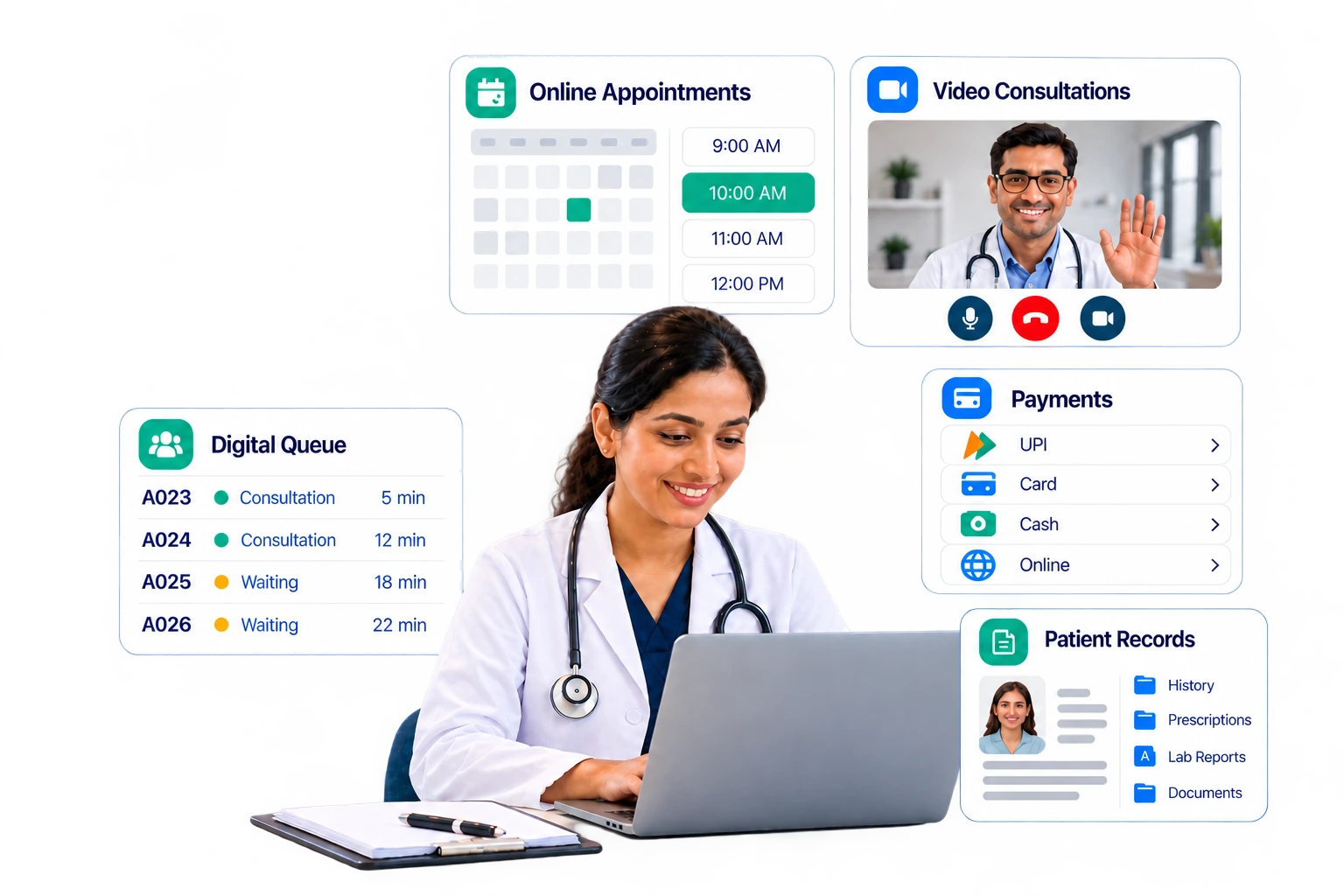
    A virtual clinic platform helps small clinics manage growth through one connected system. It combines online appointment booking, queue handling, records, payments, and video visits in a single system, so a small team serves more patients without adding tools, staff, or manual steps.

    Table of Contents

    1. Why Growth Feels Hard for Small Clinics
    2. The Simple Rule: Add Capacity, Not Complexity
    3. Signs Your Clinic Is Ready for a Virtual Clinic Platform
    4. Six Steps to Grow Without Extra Complexity
    5. What Changes for Each Role
    6. Traditional Clinic vs. Virtual Clinic Platform
    7. How to Choose Clinic Management Software
    8. Common Mistakes to Avoid
    9. Conclusion
    10. Frequently Asked Questions

    Why Growth Feels Hard for Small Clinics

    Most small clinics can find patients. The harder task is serving more of them with the same team. Every new patient adds phone calls, paperwork, payment checks, and follow-ups. When these tasks live in a notebook, a phone, and several separate apps, growth creates chaos instead of income.

    Missed appointments show the cost clearly. Industry research summarized in a June 2026 guide from Certify Health shows that no-show rates in ambulatory clinics range from 5% to 34%, depending on specialty and patient group. High-performing clinics aim for under 10%, while anything above 20% usually signals a scheduling or access problem.

    A real-world case comes from a peer-reviewed study on PubMed Central. Across 4,641 scheduled appointments at an urban outpatient clinic in 2023, 18.4% were missed, and the typical gap between booking and visit was 42 days. Long waits and missed visits often go together.

    Here is a simple example. Say a clinic books 40 visits a day and 15% are no-shows. That is 6 empty slots daily. At a ₹500 fee, the clinic loses ₹3,000 a day, or about ₹78,000 across 26 working days. This is an illustration, not a benchmark, but the same math applies at any fee level.

    Hidden complexity usually comes from five places:

    • Booking only by phone
    • Paper or verbal queues
    • Manual reminders and follow-ups
    • Billing kept apart from records
    • No weekly view of key numbers

    The Simple Rule: Add Capacity, Not Complexity

    Healthcare practice management is the work of running the business side of care: scheduling, billing, records, staffing, and compliance. Modern clinic management does this with fewer tools, not more.

    Before adding any tool, ask three questions:

    • Does it replace a manual task, or just add a new one?
    • Can patients and staff both use it with little training?
    • Does it share data with the rest of the clinic?

    A virtual clinic platform passes all three tests when it covers booking, queues, video visits, records, and payments under one login. Our guide to virtual clinic software explains the main types and features in more detail.

    Note that a virtual clinic platform is broader than a video-call app. A video app handles one task. A platform also manages booking, queues, records, billing, and reporting, so it replaces several tools instead of adding one.

    Signs Your Clinic Is Ready for a Virtual Clinic Platform

    Look for these warning signs:

    • Reception staff spend most of the day on the phone.
    • Patients complain about long or unclear waits.
    • Doctors lose time searching for old records.
    • Cash and card totals do not match at day’s end.
    • You turn away video consultation requests.
    • You cannot say last month’s no-show rate.

    If two or more apply, your clinic is likely ready for one connected system.

    Not sure where to start? Fill out our short contact form and our team will help you plan the right setup for your clinic.

    Six Steps to Grow Without Extra Complexity

    Step 1: Start with online appointment booking

    Phone-only booking caps growth, because staff can answer only one call at a time. Online appointment booking lets patients see real-time slots, choose video or in-clinic visits, attach reports, and pay in one flow. Staff then focus on exceptions instead of routine bookings. The same flow works for family members and for patients booking across branches.

    Set the basics once: slot length, maximum patients per slot, consultation fee, and cancellation window. After that, the system applies them to every booking.

    Strong appointment management also gives staff one calendar to accept, decline, reschedule, and cancel visits. One industry compilation reports that self-scheduling tools cut no-shows by 29%, and that 71% of patients believe more same-day or next-day slots would reduce missed visits. Treat these figures as directional, since they come from vendor research.

    Step 2: Digitize walk-ins and the waiting queue

    Walk-ins help growth but get messy without a system. A digital queue lets the front desk register a walk-in, assign an available doctor, and issue a token number in seconds. A live board shows waiting patients by doctor, and staff can call the next patient, skip, or reorder the line. Patients with in-clinic visits can also see their queue position on their phones, which means fewer questions at the desk and less crowding.

    Also review your booking channels, meaning walk-in, online, and phone, to see which one to grow. The daily footfall view also shows peak hours, which helps you plan staff shifts.

    Step 3: Automate reminders to cut no-shows

    Reminders are one of the simplest ways to reduce missed appointments. Set up SMS, email, and WhatsApp templates once, then let the system send them. Send marketing messages only to patients who have opted in. Real-time notifications keep patients informed about appointments, payments, and prescriptions.

    A 2024 systematic review in Health Science Reports found no-show rates between 12% and 42% in some studies. It also explains that shorter gaps between booking and visit make patients less likely to forget and more likely to attend.

    Access models matter as well. Same-day urgent care settings report no-show rates of 2% to 8%, compared with 12% to 15% in primary care practices. So offer near-term slots, send a reminder after booking and again before the visit, and give patients one-tap rebooking for follow-ups.

    Step 4: Add video visits without adding tools

    Virtual care extends your reach without new rooms. Choose a system where video runs in the browser, so patients need no app download. Look for a pre-call device check, a virtual waiting room, in-call chat, and screen sharing. Doctors control call recording, and patients give digital consent before a telemedicine visit.

    Doctors should mark each time slot as virtual, in-clinic, or both, which keeps one schedule instead of two. Privacy matters too. HIPAA is a US law, but its safeguards are a common benchmark, so review our checklist for a HIPAA telehealth platform before you go live.

    Step 5: Move records online and connect to ABDM

    Digital records save time on every visit. Doctors can record vitals, write structured notes, and issue e-prescriptions from templates, while patients can view past prescriptions and reports. AI tools add more value here. For example, AI visit comparison highlights what changed in vitals, medications, and lab results between two visits, so doctors review history faster.

    In India, the Ayushman Bharat Digital Mission (ABDM) makes digital health integration increasingly relevant for clinics. As of 10 July 2026, the mission had created more than 93.95 crore ABHA health IDs, linked over 105 crore health records, and registered 5.33 lakh facilities and 9.85 lakh healthcare professionals. Nearly 24 crore Scan & Register tokens had also been generated to speed up outpatient registration. Clinic management software with ABDM support lets a small clinic take part in this network.

    Step 6: Review a few numbers every week

    You cannot manage growth you cannot see. Use a dashboard to track five numbers, and spend 15 minutes each week comparing them with the previous month:

    • No-show rate: missed visits divided by booked visits; aim for under 10%.
    • Cancellation rate: shows whether your cancellation window works.
    • Average consult time: reveals where doctors need more time or fewer slots.
    • Revenue and outstanding payments: shows cash flow at a glance.
    • Wait time: shows whether the queue is helping patients.

    Add a second branch or more doctors only after these numbers stay steady. Larger groups weighing a similar decision can read whether a virtual healthcare platform is worth it for hospitals.

    A Simple 30-Day Rollout

    • Week 1: Add doctors, departments, and schedules.
    • Week 2: Turn on online appointment booking and payments.
    • Week 3: Start the digital queue and automated reminders.
    • Week 4: Launch video visits and review your first dashboard.

    Have a question about your rollout? Chat with us on WhatsApp and get quick answers from our team.

    What Changes for Each Role

    One platform serves four groups, and each sees only what it needs:

    • Clinic admins manage staff, branches, billing, branding, and reports from one place, and can view each doctor’s performance.
    • Doctors run video or in-clinic consultations, write e-prescriptions, and follow a live daily queue.
    • Receptionists register walk-ins, check patients in, collect payments, and close the day with a summary report.
    • Patients book, pay, join video visits, and keep their family’s records in one app.

    Traditional Clinic vs. Virtual Clinic Platform

    The table below compares both models side by side.

    AreaTraditional SetupVirtual Clinic Platform
    BookingPhone calls and notebooksOnline appointment booking, open 24/7
    Walk-insPaper lists and called-out namesDigital tokens and a live queue board
    RemindersManual phone callsAutomated SMS, email, and WhatsApp
    ConsultationsIn-person onlyIn-clinic and browser-based video
    PaymentsCash and separate billingUPI, card, cash, and pay-later in one system
    RecordsPaper filesDigital records and e-prescriptions
    ReportingMonth-end guessworkReal-time dashboard with PDF, Excel, CSV exports
    Staff workloadRises with every patientRises slowly, since routine tasks are automated

    How to Choose Clinic Management Software

    Use this checklist when comparing clinic management software:

    • One login per role: separate views for admin, doctor, receptionist, and patient.
    • Booking and walk-ins: both handled in one calendar.
    • Payments: UPI, card, cash, invoices, and gateways such as Razorpay or Stripe.
    • Messaging: SMS, email, and WhatsApp templates, plus patient consent for marketing messages.
    • Video and in-clinic modes: no app download for patients.
    • Records and ABDM support: e-prescriptions, clinical coding, and consent-based record sharing.
    • Security controls: two-factor sign-in, automatic sign-out, audit logs, and digital consent forms.
    • Reports: exports to PDF, Excel, or CSV.
    • Room to scale: multiple branches, extra doctor seats, and flexible plans.

    Platforms such as InClinic bundle these capabilities across different user roles, giving clinics a single system to manage their daily operations.

    Common Mistakes to Avoid

    • Buying a separate tool for each task. Every extra login adds training time and data errors.
    • Switching everything at once. Roll out in phases so staff can adapt.
    • Skipping staff training. A short session for each role prevents most early mistakes.
    • Ignoring consent and privacy. Store patient consent and limit access by role.
    • Not telling patients. Share your booking link on WhatsApp and your clinic website so patients know online booking exists.
    • Not measuring results. Without weekly numbers, you cannot tell what is working.

    Conclusion

    Growth does not require a bigger, busier clinic. It requires a smoother path for every patient: book online, arrive to a clear queue, consult in person or by video, pay easily, and receive follow-ups on time. A virtual clinic platform delivers that path with one system, so a small team can serve more patients while keeping daily operations simple. If you manage multiple locations, the same approach works branch by branch. Start with online appointment booking and reminders, measure the results, and add features one step at a time.

    Ready to simplify your clinic? Fill out our contact form or message us on WhatsApp to get started.

    Frequently Asked Questions

    FAQ
    What is a virtual clinic platform?

    A virtual clinic platform is software that runs online appointment booking, video and in-clinic visits, queues, records, payments, and reports from one system. Patients use one app, while doctors, receptionists, and admins each get their own dashboard built for their daily tasks.

    What is clinic management software?

    Clinic management software handles daily clinic tasks such as scheduling, patient records, billing, prescriptions, and reporting. A virtual clinic platform adds remote video consultations, online payments, and patient-facing tools on top, so the whole patient journey stays in one connected system.

    How can a small clinic grow without hiring more staff?

    Automate routine work first, including online booking, reminders, queue tokens, and digital invoices. When software handles these repetitive tasks, the same team can serve more patients without extra hires or extra tools.

    How to reduce patient no-shows?

    Shorten the wait between booking and visit, send reminders by SMS or WhatsApp, and make rescheduling easy. Then track your no-show rate every month and aim for under 10%, the benchmark high-performing clinics target.

    Why do small clinics need online appointment booking?

    Patients can book at any hour, and staff answer fewer routine calls. The calendar also updates instantly, which helps avoid double booking and keeps doctors’ schedules full, so the clinic grows without adding front-desk workload.
  • Is a Virtual Healthcare Platform Worth It for Hospitals?                                 Benefits, ROI, and Real Use Cases

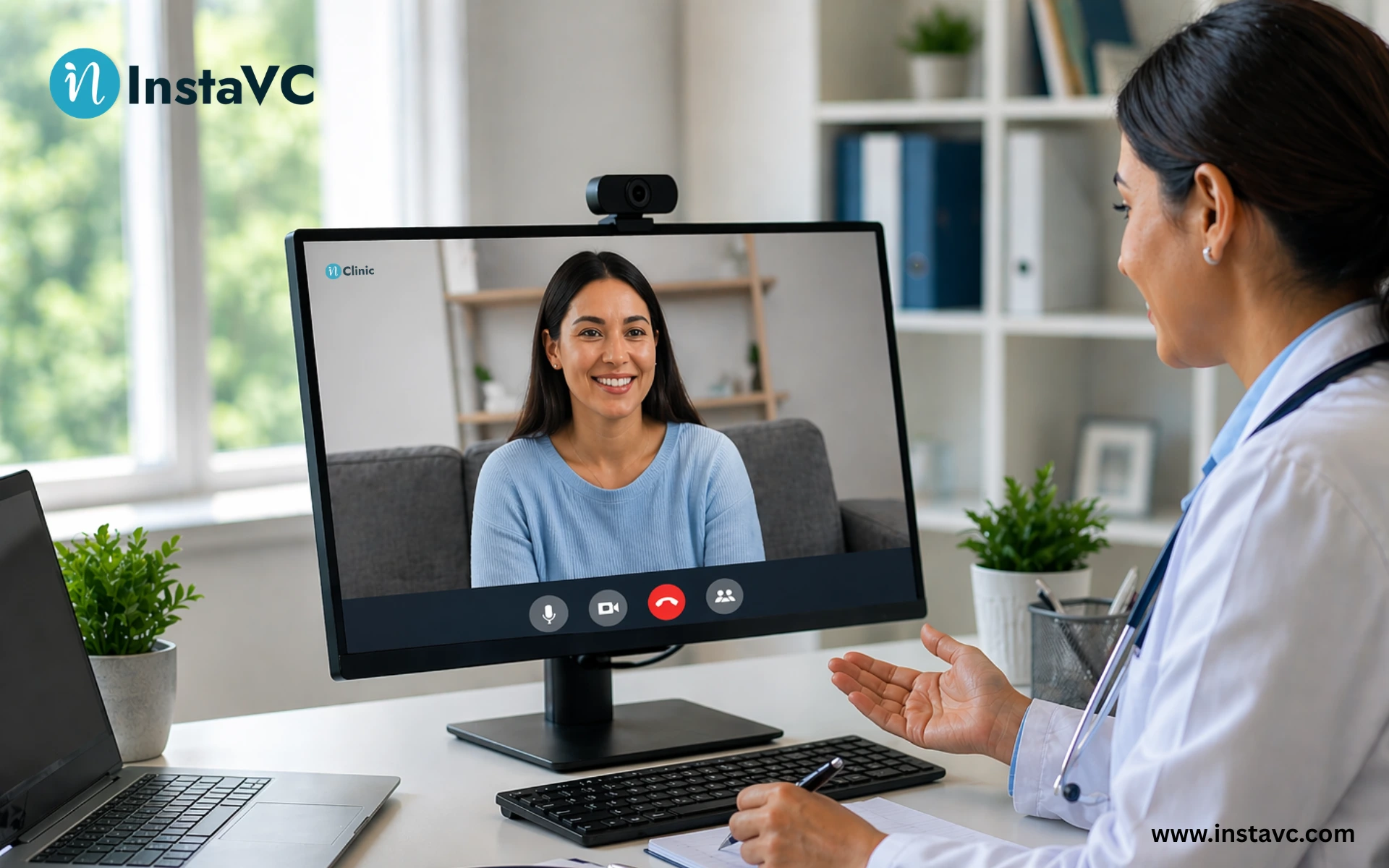
    Is a Virtual Healthcare Platform Worth It for Hospitals? Benefits, ROI, and Real Use Cases

    A virtual healthcare platform lowers hospital costs, cuts patient wait times, and improves access to care. It connects scheduling, patient records, and secure billing into one smooth online clinic platform, going far beyond basic video calls.

    Hospitals today face tight budgets, long wait lines, and exhausted medical staff. Moving to a digital care model helps solve these exact problems. However, hospital leaders often wonder if the investment in new software will actually pay off.

    This guide breaks down the real return on investment (ROI), the daily benefits for doctors and patients, and the actual use cases that make this technology essential for modern hospitals.

    Table of Contents

    The Real ROI of Virtual Care for Hospitals

    When you look at the financial side, the value of a digital clinic becomes clear very quickly. According to recent medical studies on no-show rates, hospitals that use a full digital system see a massive drop in missed appointments. This directly protects hospital revenue.

    Here is a close look at how a dedicated system brings real financial return to your hospital:

    • Fewer Missed Visits: Patients often miss appointments due to traffic, bad weather, or lack of transport.Virtual visits remove these physical barriers.Automated text and email reminders keep patients on track and ensure the doctor’s schedule stays full.
    • Lower Facility Costs: When more patients see doctors online, the hospital uses fewer physical resources. You save money on waiting room space, physical exam rooms, paper products, and basic medical supplies like gloves and gowns.
    • Wider Patient Reach: A physical building limits your hospital to local patients. An online clinic platform allows your doctors to treat patients who live hours away or in rural areas that lack good medical care. This brings new patients into your health system.
    • Better Staff Time: Doctors spend less time walking between rooms and waiting for patients to arrive. A smart platform moves the doctor from one virtual room to the next instantly.
    • Faster Billing Cycles: Good platforms log the exact start and end time of every visit. The billing team uses this exact data to send clean, accurate bills to insurance companies. This speeds up payments and stops denied claims.

    Need help fixing hospital workflows and stopping missed appointments? See how our smart booking system speeds up intake. Book a personalized demo of our platform.

    Virtual Healthcare Platform vs. Basic Telemedicine

    Many clinics make the mistake of using consumer video apps for medical care. These basic apps are fine for chatting with friends, but they fail in a real medical setting. They do not connect to hospital records and lack proper security.

    To understand the exact steps to transition away from basic tools, read our complete virtual clinic software guide.

    A true virtual platform is a complete medical workspace. It is professional video collaboration software built specifically for healthcare. Here is how a real platform compares to basic apps:

    FeatureBasic Telemedicine AppDedicated Virtual Healthcare Platform
    Patient RecordsManual entry onlyConnects directly to hospital data
    Waiting RoomsNoneSecure virtual waiting areas with patient queue
    Billing TrackingHard to track visit lengthLogs exact time for accurate, clean bills
    Security StandardBasic consumer privacyFull medical-grade security
    Doctor WorkflowSeparate screen for notesNotes and video on the same screen

    Solving the Doctor Burnout Problem

    Doctors are tired. They spend hours every day clicking through confusing software and typing notes after their shifts end. A good digital system must make the doctor’s job easier, not harder.

    • Everything in One Place: Doctors do not want to switch between a video screen and a patient record screen. A proper platform puts the video feed, the patient history, and the medical notes in one single view.
    • Smart Scheduling: You cannot treat doctors like on-demand drivers. A good system handles complex schedules, blocks out time for breaks, and respects the doctor’s real working hours.
    • Automated Intake: Before the doctor even joins the call, the software asks the patient basic questions about their symptoms. The doctor reads this summary instantly and starts providing care right away without wasting the first ten minutes on basic questions.

    The Patient Experience: Keeping It Simple

    If the software is hard to use, patients will not use it. Older patients or those who are not good with technology often struggle to download heavy applications or remember complex passwords.

    The best platforms focus on simple access. They provide Web & App Access, meaning patients can choose exactly how they join. They can download a dedicated app if they want, or they can simply click a safe web link sent to their phone or email. This removes the tech barriers. The patient clicks the link, enters a secure virtual waiting room, and waits for the doctor.

    Tired of patients struggling with app downloads before their visit? Give them simple access. Explore our secure virtual healthcare platform.

    Real Use Cases in Modern Hospitals

    Hospitals use these systems for much more than just treating common colds or sinus infections. Real use cases span across many different medical departments.

    • Post-Surgery Follow-ups: After a major surgery, traveling back to the hospital is painful and dangerous for the patient. Doctors use video calls to check healing progress, look at surgical wounds, and adjust pain medication without making the patient leave their bed.
    • Mental Health Therapy: Therapists and psychiatrists need a safe, private space for ongoing care. Virtual platforms give patients the comfort of talking from their own homes. This leads to more consistent therapy sessions and better mental health outcomes.
    • Chronic Care Tracking: Patients with heart disease or diabetes need constant monitoring. Doctors use virtual platforms to check blood pressure and blood sugar data from remote devices between visits. This helps spot warning signs early before the patient needs emergency care.
    • Urgent Care Triage: When a patient feels sick, they often go straight to the emergency room, even if they do not need to. A virtual triage system lets a nurse speak to the patient online first. The nurse can tell the patient to stay home and rest, go to a local clinic, or head to the emergency room. This keeps the emergency room clear for true emergencies.
    • Specialist Consultations: Small rural hospitals do not always have experts like neurologists on staff. With a digital platform, a rural doctor can bring a city specialist onto the video call to help diagnose a complex patient case instantly.

    Security and Compliance: Keeping Patient Data Safe

    Protecting patient facts is the absolute most important part of digital care. Public video apps put hospitals at massive risk of data leaks and heavy fines.

    According to federal guidelines for secure telehealth, strict access controls stop unauthorized users from joining medical calls. A proper system encrypts all video, audio, and text data. This means that even if a hacker tries to listen, the data looks like scrambled code.

    To protect your hospital, you must ensure your system meets all privacy laws. You can learn how to build a safe system with a HIPAA telehealth platform.

    • Secure Waiting Rooms: Patients wait in private digital rooms. They cannot see or hear other patients.
    • Data Control: The hospital owns all the data. The video software company cannot look at the patient records or sell the data.
    • Audit Trails: The software tracks exactly who logs in, what files they look at, and how long they stay. This helps hospital IT teams spot any strange activity instantly.

    Managing Virtual Workflows and Teams

    Running a hospital means managing hundreds of moving parts. A digital clinic is no different. Hospital administrators need tools to run the online clinic smoothly behind the scenes.

    • Move Patients Quickly: In a busy virtual clinic, nurses need to move patients from a general waiting room into a specific doctor’s private room. Good software allows staff to manage participants easily, moving them around just like in a physical building.
    • Multi-Doctor Calls: Sometimes a patient needs to speak to their primary doctor and a heart specialist at the same time. The platform must allow multiple doctors to join the same secure call without dropping the connection.
    • Screen Sharing for Test Results: Doctors need to show patients their X-rays or blood test results. Safe screen sharing lets the doctor point out specific details on the scan so the patient understands their own health better.

    Connecting to Existing Hospital Systems

    A new software tool is useless if it does not talk to the tools your hospital already uses. The best virtual platforms connect directly to your hospital’s main Electronic Health Record (EHR) system.

    When the systems connect, magic happens. The doctor schedules the video visit in the main hospital system. The virtual platform automatically creates the secure video link and sends it to the patient. When the visit ends, the exact length of the call and the doctor’s notes save directly back into the main patient file. There is no double-typing, no lost data, and no confusion.

    This deep connection also helps the pharmacy. If the doctor prescribes medicine during the virtual call, the system sends the order straight to the patient’s local pharmacy automatically. The patient just drives over and picks it up. This smooth process builds trust and keeps patients happy.

    Making the Final Decision

    Choosing to adopt a comprehensive digital system is a big step for any hospital. It requires training staff, changing old habits, and investing money upfront. However, the long-term benefits clearly outweigh the initial effort.

    By reducing missed visits, saving physical resources, speeding up billing, and keeping doctors happy, a strong platform pays for itself. Most importantly, it gives patients the fast, easy, and safe medical care they expect today.

    Frequently Asked Questions

    FAQ
    What is a virtual healthcare platform?

    It is a complete digital system that allows hospitals to manage online patient visits, share medical notes, and handle billing safely in one single place. It replaces basic video apps with a secure, medical-grade workspace.

    How does a hospital measure the ROI of online care?

    Hospitals track the drop in missed appointments, the time saved by doctors between visits, and the reduction in physical clinic costs. They also look at new revenue gained by reaching patients in distant areas.

    Why do basic video apps fail in hospital settings?

    Basic consumer apps lack the strict security required by privacy laws. They also fail to connect to medical records, forcing doctors to type notes twice and wasting valuable time.

    How do older patients handle the technology?

    The best platforms use simple web links. Patients do not need to create accounts or download large applications. They simply click a secure link sent via text message to join the doctor instantly.

    Is online patient data actually safe from hackers?

    Yes, if you use a certified platform. Real medical platforms use deep encryption for all video and text. They also use secure waiting rooms and strict login rules to ensure only the right doctor and patient can join the call.

  • The Definitive Guide to HIPAA-Compliant Telehealth Platforms

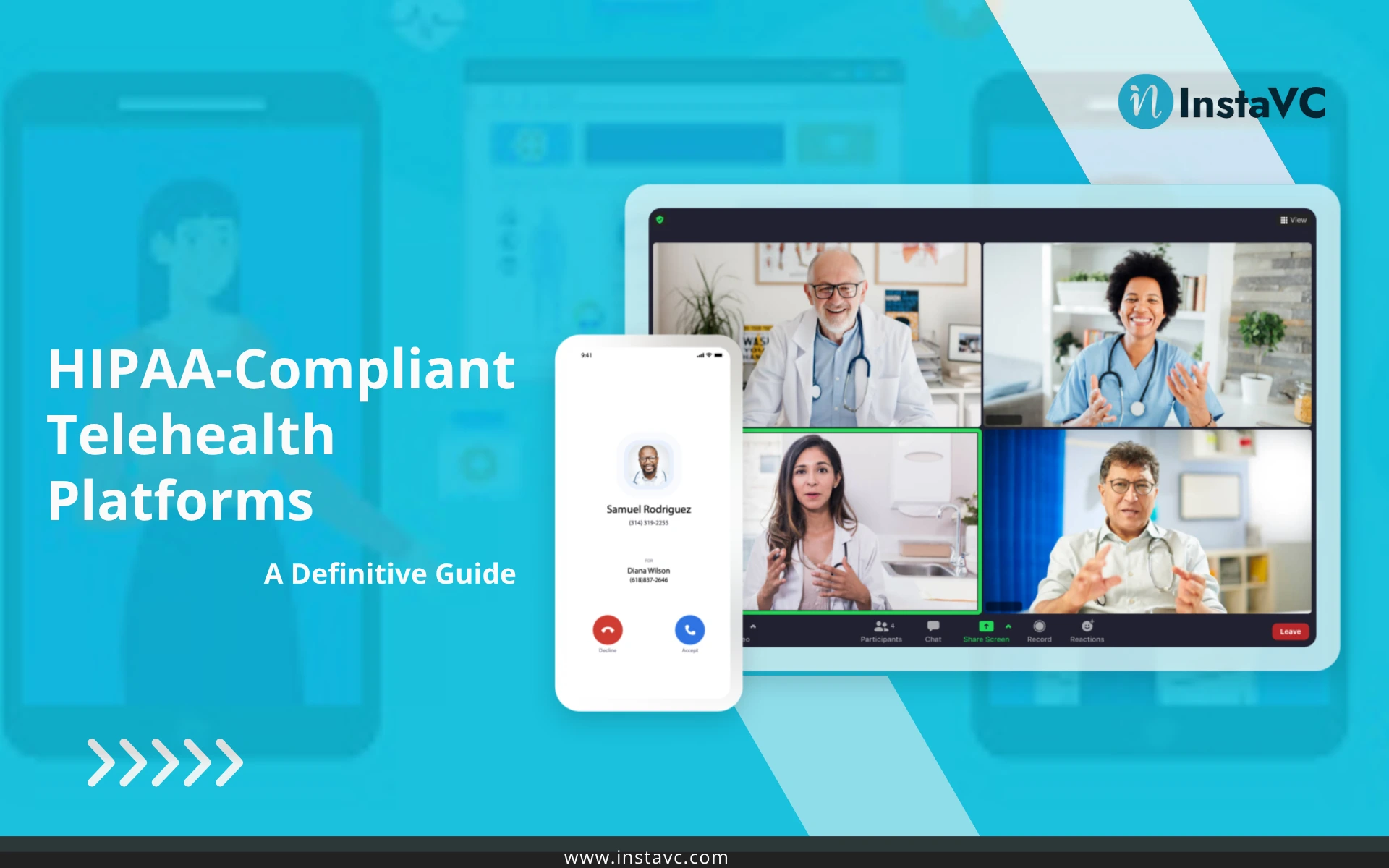
    The Definitive Guide to HIPAA-Compliant Telehealth Platforms

    If you are trying to figure out what a HIPAA-compliant telehealth platform is, you have come to the right place. As a critical piece of modern health care technology, it’s essential to understand it fully. This is the only guide you will need. In this definitive guide, we will break down exactly what a HIPAA-compliant telehealth platform is, why it’s non-negotiable for your health clinic, and what you need to look for to select the right platform for your practice.

    Table of content

    What is a HIPAA-compliant Telehealth Platform?

    To truly understand what makes a telehealth platform “HIPAA compliant,” you first have to understand all its essential parts.

    What is a Telehealth Platform?

    A telehealth platform, often called telemedicine software, is the digital tool you use to provide healthcare to your patients when you aren’t in the same physical room. This software allows you to deliver care remotely, through video calls, secure chat, sharing health information, and even connecting with remote patient monitoring devices.

    Think of it as an online space where you can continue to provide the same great care your patients expect, just with more convenience and flexibility.

    Let’s Decode HIPAA Compliant

    What Does HIPAA Stand For? HIPAA is the acronym you will see everywhere. It stands for the Health Insurance Portability and Accountability Act of 1996. In simple terms, it’s the mandatory U.S. federal law that sets the national standard for protecting a patient’s sensitive health information.

    Also, what about the compliant part? That word simply means your practice and technology are strictly following all the rules and safeguards outlined in the HIPAA rulebook.

    So, What is a HIPAA Compliant Telehealth Platform ?

    Here’s what you get when you put everything together into one:

    A HIPAA-compliant telehealth platform is a specialized type of health care software that has been purpose built for Healthcare settings.

    Unlike the everyday apps you use for social video calls, these platforms are constructed from the ground up with one primary goal: to protect sensitive patient information. They achieve this by integrating the specific technical, administrative, and physical safeguards required by HIPAA into every part of their design.

    Why Using a Telehealth Platform that is HIPAA Certified is a Big Deal?

    It all comes down to one thing: delivering excellent patient care and protecting your patients.

    The entire purpose of this law is to safeguard a person’s private and sensitive health data, known as Protected Health Information (PHI). This includes everything from their name and address to their diagnosis and medical history.

    Following HIPAA rules means this information remains confidential, which is the foundation of the trust between you and your patients.

    But What Happens If a Healthcare Provider Fails to Comply?

    The consequences can be devastating for a healthcare practice.

    The U.S. government enforces this law strictly. Violations can result in severe financial penalties that can range from a few hundred dollars to millions, depending on the severity of the violation.

    Beyond the fines, a violation can trigger mandatory corrective action plans and lead to significant legal trouble.

    The bottom line is that if you fail to comply with HIPAA, it can jeopardize the financial health and reputation of your entire practice.

    What About Using Consumer Apps?

    This is one of the reasons why using standard, consumer-grade applications like FaceTime, WhatsApp, Skype, or Facebook Messenger for patient consultations is a major compliance risk.

    Why? Because these tools were built for casual conversations, not for healthcare. They lack the specific security safeguards that HIPAA demands.

    The Technical Difference: What Separates a Compliant Platform from a Non-Compliant One?

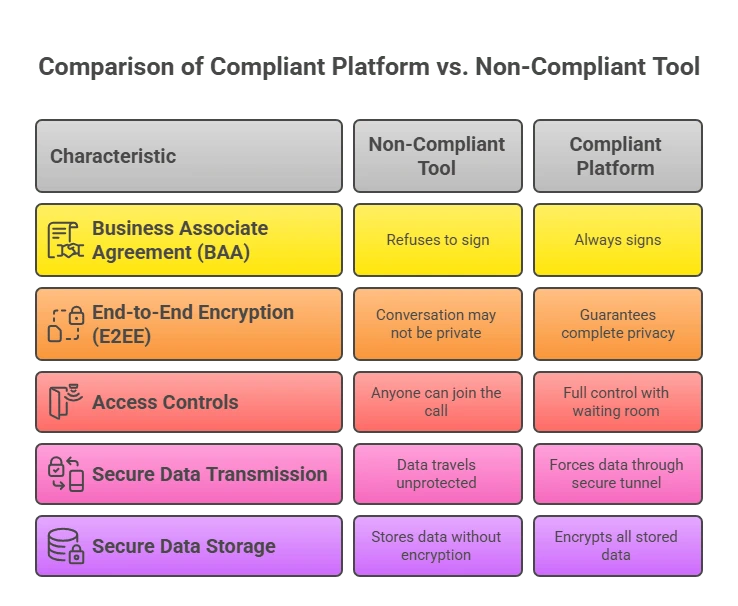
    Choosing a HIPAA-compliant platform is a absolute must. But what actually makes a platform compliant? What’s the real technical difference between a professional telehealth solution and a consumer app? Let’s break it down :

    What About the Legal Contract (the BAA)?

    A Business Associate Agreement (BAA) is a legally required contract between a healthcare provider (that’s you) and a technology vendor (like a telehealth platform). As part of a Healthcare IT solution, this contract legally binds the vendor to protect your patients’ health information according to all the strict requirements of HIPAA.

    • A non-compliant app will not sign a BAA with you. By not signing the BAA, all the legal responsibility for protecting patient data falls 100% on your shoulders. It is a direct violation of HIPAA.
    • In contrast, A truly compliant telehealth platform will always sign a BAA with you before you start using their service. By signing the BAA, the vendor sharing the responsibility for safeguarding patient data. This contract gives your practice a critical layer of legal and financial protection. Excellent, I will continue in that exact simple the three-part style.

    2. How Private is the Conversation (End-to-End Encryption)?

    End-to-End Encryption (E2EE) is a security feature. This is like sending a message in a sealed, unbreakable box that only the recipient can open. It scrambles the video and audio of your consultation on your device and only unscrambles it on your patient’s device.

    • A non-compliant app might not use E2EE for its video calls. This means the company providing the app could potentially access the live conversation between you and your patient. This creates a significant privacy risk, as this case example shows, and exposes sensitive details discussed during the consultation.
    • In contrast, a compliant platform uses strong E2EE for all live video and audio. This guarantees that no one in the middle—not even the platform’s own employees—can ever see or hear the content of your sessions.

    3. Who Controls the Door (Access Controls)?

    Access Controls are the digital locks and security guards for your virtual clinic. These are features like virtual waiting rooms and password-protected sessions that you use to control exactly who can enter a consultation, and when.

    • A non-compliant app often works like an open door—anyone with the meeting link can try to join. This creates a huge risk of an unauthorized person “zoom-bombing” or accidentally entering a private patient session, which is a serious privacy breach.
    • In contrast, a compliant platform puts you, the provider, in full control. It uses a virtual waiting room that requires you to admit each patient manually. This simple step ensures only the correct patient can enter the consultation at the right time.

    4. Is Your Data Safe While It Travels (Secure Data Transmission)?

    Secure Data Transmission is about protecting your patient’s information while it’s traveling across the internet. It uses strong encryption, like AES 256-bit, to wrap the data in a secure digital tunnel (HTTPS) so it can’t be read by anyone trying to spy on it as it moves.

    • A non-compliant app might send data without this secure tunnel. This leaves sensitive information exposed, making it possible for hackers on the same network to intercept and steal patient data, such as information typed into a chat or registration form.
    • In contrast, a compliant platform forces all data to travel through this highly secure, encrypted tunnel. This ensures that all communication—from chat messages to shared files—is completely protected from eavesdropping as it moves between you, your patient, and the platform’s servers.

    5. How Secure is Your Stored Data (Secure Data Storage)?

    Secure Data Storage, also known as protecting data “at rest,” means keeping patient information safe when it is saved on a server. This involves using strong encryption to make the stored files completely unreadable to anyone without authorization.

    • A non-compliant service might store patient data on their servers in plain text. This is like leaving sensitive patient files in an unlocked filing cabinet. If a hacker ever breaks into their systems, all of that private information is exposed and easy to steal.
    • In contrast, a compliant platform ensures that any patient data it stores like chat logs or uploaded documents is always encrypted “at rest”. This means that even if a criminal managed to access the server, the information would be scrambled and useless.
    comaprison-table

    The Anatomy of a Compliant Platform: A Checklist of Essential Workflow Features

    Technical features is an essential foundation for any HIPAA-compliant platform. But they are only half the story. For a platform to be useful day to day, it must have other workflow and administrative features. Let’s see these features in more detail:

    Technical Features for Secure Operations

    These are the powerful, behind-the-scenes tools that are built into a compliant platform. They work automatically to keep data safe and make your job easier.

    • Secure EHR/EMR Integration: This is a secure, automated connection that allows your telehealth platform and your main Electronic Health Records software (EHR) to talk to each other and share patient data seamlessly. It eliminates the need for your staff to manually copy-paste information from one system to another.Platforms like Healthray EMR Software provide seamless integration between telehealth services and electronic medical records, enabling secure real-time patient data synchronization, improved clinical workflows, and enhanced continuity of care.
    • Compliant APIs and SDKs: For larger hospitals or health systems, these toolkits allow their own developers to build the platform’s video and chat functions directly into their existing patient portal or mobile app. This is crucial for large organizations that want to offer a completely unified and branded patient experience.
    • Automated Data Retention Policies: This is a system feature that lets your practice set automatic rules for how long different types of patient data are kept before being securely archived or permanently deleted, based on legal requirements.

    Administrative Features for Compliant Workflows

    These features are the tools that help you manage your practice’s day-to-day tasks in a way that is both efficient and fully compliant with HIPAA.

    • Patient Consent Management: This is a built-in feature that allows you to obtain and digitally document your patient’s consent for telehealth treatment, typically right before their virtual session begins.
    • Granular User Roles & Permissions: Think of this as the master control panel for your staff’s access. It allows an administrator to assign different roles like front desk, nurse, or doctor and then control exactly what each role is allowed to see and do within the platform.
    • Secure Patient Messaging: What it is: This is a private, built-in chat system that acts as a secure alternative to standard email or SMS text messages. It creates a dedicated channel for you and your patients to communicate about follow-up questions, appointment details, or other health matters.

    What Are the Different Types of HIPAA-Compliant Telehealth Platforms on the Market?

    When you start looking for a HIPAA-compliant telehealth platform, the number of options in the digital health market can feel overwhelming. The telehealth market today is mature, highly competitive, and it’s often difficult to tell the difference between all the vendors. Here’s how you can categorize:

    Most basic Telehealth Market Categories

    • The Giants: These are large, well-known technology companies that have adapted their general-purpose communication tools for the healthcare industry. These are also General-Purpose Platforms. These platforms, originally built for corporate meetings, have been retrofitted for healthcare.
    • The EHR Platforms Providers: These are the companies that provide the main Electronic Health Record systems for practices. Many of them now offer a telehealth feature as an add-on or built-in module to their existing software.
    • The Healthcare-Specific Specialists: These are companies that focus exclusively on building telehealth and virtual care platforms from the ground up for the healthcare industry. They are purpose-built for clinical workflows. For any serious healthcare practice, a specialized, healthcare-specific platform is the superior choice.

    How to Evaluate a Vendor: Your 5-Point Checklist

    As you compare platforms, use this simple five-point checklist to make sure you’re covering the most important areas.

    1. Compliance and Security: Do they sign a BAA without hesitation? Can they prove their security with specifics, like mentioning End-to-End Encryption and AES 256-bit on their website?
    2. Clinical Workflow Fit: Does the platform streamline your entire patient journey, from the moment they book an appointment to your follow-up communication? Does it integrate smoothly with your EHR?
    3. Patient & Provider Experience: Is it simple enough for your least tech-savvy patient to use without a frustrating phone call to your front desk? Is the interface intuitive and efficient for your staff?
    4. Total Cost of Ownership: What is the real price you will pay? Ask about any setup fees, per-call charges, or costs for additional features to understand the true investment.
    5. Partnership and Support: Do they seem like a long-term partner who understands the unique needs of healthcare? Do they offer live, 24/7 technical support in case you or a patient has an issue during a call? For healthcare legal research or reviewing relevant case precedents, tools like the Casenote case search platform can help you quickly access accurate information.

    Is inClinic the Best New HIPAA-Compliant Telehealth Platform on the Market?

    It’s true that many platforms claim to be “HIPAA compliant.” But is simple compliance the true measure of a great telehealth platform? We don’t think so. The “best” platform should masterfully combine different elements of the complete clinical workflow into a single, professional solution. Here are four reasons why inClinic is the new standard:

    1. Many competing platforms offer you little more than a secure video link. This forces your practice to juggle multiple disconnected tools for scheduling, patient intake, payments, and prescriptions—a process that is inefficient and invites error. But inClinic is different. It enables you to manage your entire patient journey from a single platform.
    2. inClinic was built with a “security-by-design” approach. It means compliance and patient protection are at its very core. It’s built on a modern WebRTC platform, which has security protocols built in by default. It employs strong 256-bit AES Encryption, with End-to-End Encryption (E2EE).
    3. The most advanced platform in the world is useless if your patients struggle to use it. That’s why inClinic is designed for superior accessibility. This means your patients never have to download or install any software. They just click a link and join the session from their browser. This removes one of the biggest technical hurdles for patients, especially those who are not tech-savvy.
    4. When a patient visits you online, they should feel like they are visiting your practice, not a generic, third-party software company. That’s why with inClinic, you have the ability to customize the platform with your clinic’s own logo, colors, and branding for a completely professional look.

    Your Next Step: Making the Confident Choice

    Choosing a HIPAA-compliant telehealth platform is one of the most important decisions you’ll make for the future of your practice. It can mean safeguarding your patients, protecting your practice, and building a foundation of trust for virtual care.

    You now know why a platform purpose-built for healthcare is the superior choice. The next step is to see it in action. We built inClinic on the principle that the best technology should make providing excellent, secure care easier, not harder. We invite you to schedule a personalized demo to see how a browser-based platform can help you protect your patients and streamline your entire clinical workflow.

    FAQs

    FAQ
    How is telehealth HIPAA compliant?

    A telehealth service becomes HIPAA compliant when the provider utilizes a platform with the required security features, such as end-to-end encryption. Most importantly, the platform vendor must sign a Business Associate Agreement (BAA), which is a legal contract that binds them to protect all patient health information according to HIPAA rules.

    What is the HIPAA platform?

    There isn’t one single “HIPAA platform.” A HIPAA-compliant platform is any telehealth software that has been purpose-built for healthcare with all the necessary technical, administrative, and physical safeguards required by law. The company providing such a platform will always sign a Business Associate Agreement (BAA) with a healthcare provider.

    What is the most used telehealth platform?

    According to 2024 market data, the most widely used platform for telehealth is Zoom, holding about 36% of the market. However, providers must use a paid Zoom for Healthcare plan and sign a BAA, as the standard, free version of Zoom is not HIPAA compliant.

    What features should a HIPAA platform have?

    They save time and money primarily by eliminating the need for business travel. Companies save a lot on flights and hotels, and employees can use the time they would have spent traveling to get more work done.

    How to check if a telehealth platform is HIPAA compliant?

    The simplest and most important way to check is to ask the vendor one question: “Will you sign a Business Associate Agreement (BAA)?” If the answer is “yes,” they are legally accountable. You should also check their website for mentions of key security features like “end-to-end encryption.”

  • The Rise of Virtual Clinic Software: Guide to Trends, Predictions, and Choosing the Right Platform

    The Rise of Virtual Clinic Software: Guide to Trends, Predictions, and Choosing the Right Platform

    It feels like the world of healthcare has changed almost overnight, doesn’t it?

    If you’re a doctor or a clinic administrator, you’re likely feel it every day.

    One moment, it was a distant idea, the next, it became an essential part of modern healthcare.

    It’s the new reality, and it’s moving at a pace that can feel overwhelming. And with this new reality comes a flood of new questions.

    How do you make sense of it all and choose the right path? How do you find a solution that is secure for your patients and smart for your practice?

    We understand. And we’re here to help.

    In this article, we will walk through everything you need to know about Virtual Clinic Software. You will learn not just what this technology is, but why it’s on the rise, what key trends define the best Telemedicine Software today, and exactly how to make a confident, strategic decision for your practice.

    What Is a Virtual Clinic Platform?

    Let’s start by clearing up the confusion. You might hear some people call it “software,” while others say “platform.” So, let’s make it simple.

    That difference is a single piece of software is like one tool—maybe just a video calling app. A real Telemedicine Platform is like a full toolbox. It’s a complete system that takes care of everything for a patient. From the moment they book an appointment to the follow-up care they get afterward, it’s all in one place.

    Virtual clinic software, on the other hand, is the technology that allows you to manage your medical practice online. This helps you connect with patients for consultations, schedule their appointments, and manage their care from a distance.

    The Rise of Virtual Healthcare Platforms: A Permanent Transformation

    It’s easy to think that the massive shift to virtual care was just a temporary.

    But the truth is, It’s a permanent transformation, and the forces driving it were set in motion long before the pandemic accelerated everything.

    Recent reports show that the telehealth market is going to grow a lot and could reach hundreds of billions of dollars in the next few years.

    Telehealth Market

    What’s really fuelling this change?

    It comes down to a few fundamental demands:

    • Your patients demand convenience. People want healthcare that fits into their busy lives. They want to avoid travel, traffic, and long waits in waiting rooms.
    • Your practice needs efficiency. You and your team are always looking for better ways to work. This technology can help you set up appointments easily, send reminders without hassle, and lighten the load of admin tasks.
    • Our communities need better access to care. Virtual platforms break down geographical barriers, connecting patients in rural areas or those with mobility issues to the specialists they need to stay healthy.

    Ultimately, the Virtual Healthcare Platform is here to stay because it creates a better, more responsive relationship between doctors and patients.

    5 Key Trends Defining the Best Telemedicine Platforms

    Technology is changing so fast that it can feel overwhelming. It’s tough to figure out what really matters and what’s just flashy stuff.

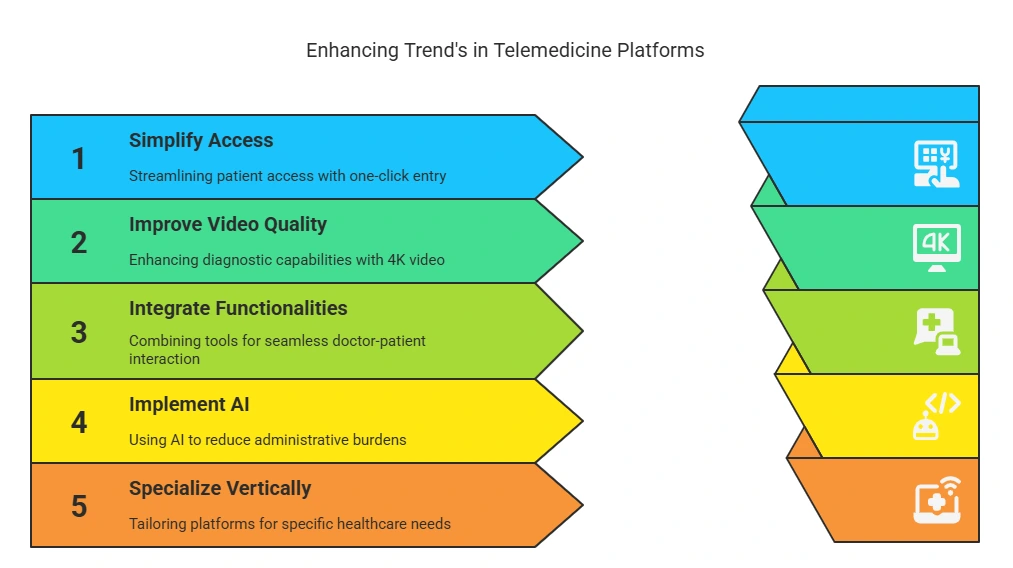
    To help you cut through the noise, we’ve identified the five key trends that separate an adequate tool from a truly great Online Consultation Platform.

    Telemedicine Platforms

    Trend #1: Effortless One-click Patient Access is Now the Standard

    The biggest problem with adopting any telehealth is the friction. First, you had to download a specific app, set up a new account, remember a password, and hope everything worked smoothly. If you’re already feeling sick or stressed, all these steps might just make you give up. This is especially true for older folks or anyone who isn’t great with technology.

    But that entire model is now outdated.

    The leading trend in virtual care is the move toward radically simple, one-click access.
    Today, we’ve browser-based WebRTC technology. This is the best choice for easy access because it lets patients have secure video calls right in their web browser, like Chrome or Firefox. They don’t need to download or install anything. Patients can join a call from their phone, tablet, or computer with just one click. This ease of use should be the goal for any good platform.

    Trend #2: The Push for “Better-Than-Being-There” Video Quality

    In healthcare, video isn’t just for conversation; it’s a diagnostic tool. But the quality and reliability of the video stream directly impact your ability to diagnose and treat patients effectively.
    But the standard-definition video just doesn’t cut it for good medical care. That’s why more people are looking for Ultra High-Definition (4K) video. Platforms that support 4K resolution can make remote doctor visits much better and more effective.

    Trend #3: Deep Integration is Creating the True “Doctor-Patient Platform”

    In this fast-moving healthcare world, doctors have a lot on their plates. They juggle video calls, manage patient records, and try to keep their schedules in check. This constant switching between responsibilities is not just annoying; it’s a huge time drain.

    What’s worse? It distracts them from focusing on the most important aspect of their work: the patient.

    As more healthcare workers get frustrated, they’re looking for easier ways to do their jobs. This causes them to shifting towards Telehealth Software Solutions that integrate various functionalities into one platform.

    Why? People value simplicity and efficiency. These solutions help reduce the chaos and restore focus where it truly belongs. A simple system like this easily connects with other important software can really change how doctors and patients work together. There is no need to jump between different apps. Now, healthcare providers can give their patients a much smoother experience.

    This integration not only enhances communication but also improves overall patient care. Ultimately, when doctors can focus more on their patients, everyone benefits.

    Trend #4: Practical AI is Enhancing the Human Connection

    The main idea of using AI in healthcare is not to take over a doctor’s job. Instead, it works quietly in the background, helping with tasks like paperwork. This lets doctors spend more time with their patients. By handling annoying distractions and routine tasks, it helps doctors focus more, listen better, and connect with patients on a deeper level.

    Trend #5: Vertical Specialization is Outperforming General Tools

    The final, and perhaps most important, trend is the shift away from one-size-fits-all business tools toward platforms that are purpose-built for specific industries.
    While general platforms like Zoom or Microsoft Teams are great for corporate meetings, they were not designed with the unique needs of healthcare in mind. They often lack the specific workflows, security protocols, and compliance frameworks that are essential in a medical setting.

    Choosing a platform that is vertically specialized for healthcare means you are getting a tool that speaks your language. It understands the importance of HIPAA, it’s designed around the doctor-patient workflow, and its features are tailored to clinical use cases. This leads to a smoother, safer, and more effective experience for both you and your patients.
    When evaluating your options, ask one simple question: “Was this platform built from the ground up for healthcare?”

    Look for a provider whose main goal is to create specialized software for different industries. This focus is the clearest sign that you are choosing a partner who deeply understands your world and has designed their Online Medical Consultation Software to meet your specific needs.

    Predictions: What’s Next for Virtual Care Platforms?

    The world of virtual care is always changing. The trends we see now are just the start of a smarter future. Here’s what we think will happen next with this technology.

    Prediction #1: AI Will Evolve From a Simple Assistant to a Smart Analyst

    The practical AI we see today—features like background noise cancellation or basic transcription—is just the first step.

    The next evolution is already on the way.

    Soon, AI will become a true analytical partner for your practice.

    Think about an AI that doesn’t just transcribe your consultations, but can analyze patient sentiment, measure speaking time, or provide summaries of key clinical information, drastically reducing your documentation burden after hours. This offloads the cognitive burden of administrative tasks so you can dedicate 100% of your mental energy to your patient.

    So, when choosing a platform, you should ask vendors about their long-term AI roadmap. A forward-thinking company will already be exploring how to use AI not just to make calls clearer, but to make your entire practice run smarter.

    Prediction #2: The Wall Between Systems Will Crumble with True Interoperability

    In the future, your Virtual Care Platform will be the main place that talks to every part of healthcare. It will make sharing information easy and smooth for everyone involved.
    Here is an example:

    When lab results come in from another place, they will show up right in the patient’s chart. This will send you a notice in your virtual care platform, letting you start a video call with the patient right away. If you need to send a prescription during that call, it will go straight to the patient’s chosen pharmacy without any hassle—no phone calls or extra forms needed!

    This shows that platforms with strong, flexible APIs are likely to do well in the future. Being able to connect with other systems isn’t just a nice addition; it’s key to being part of the future of connected healthcare.

    Prediction #3: The Model Will Shift from “Telehealth” to a Continuous “Virtual Care” Ecosystem

    Many people think of telehealth in terms of discrete events: a scheduled video appointment that replaces an in-person visit.

    But this is a very limited view.

    This is the shift from “telehealth” to a true Virtual Care ecosystem.

    In this system, data from remote health devices will go straight and safely into your online care platform. This lets you keep an eye on how a patient is doing, notice any concerning trends before they become big problems, and step in when you need to.
    It changes care from being reactionary to being proactive, which is better for both patient health and how your practice runs.

    That’s why we recommend you to look for platforms that are already thinking about how to manage different types of patient interactions, not just live video calls.

    Prediction #4: The Rise of Fully Unified Hardware & Software Solutions

    One of the biggest headaches in setting up any kind of conferencing system has always been the challenge of making hardware from one company work perfectly with software from another.

    But that era is coming to an end.

    A major prediction for the future is the rise of fully unified solutions, where you can get a single, guaranteed-to-work system from one trusted provider.

    We are already seeing the beginnings of this trend today, as software-focused companies are partnering deeply with hardware manufacturers to offer these kinds of integrated packages.

    When you are making a choice, it is wise to consider vendors who have a strong, established relationship with hardware experts, as this is a clear indicator of where the market is heading.

    Prediction: “Hybrid Care” Will Simply Become “Care”

    The debate over “virtual vs. in-person” care will soon seem as outdated as the debate over “online vs. print” newspapers.

    The future is hybrid.
    The new standard of care will intelligently and flexibly blend the best of both worlds to create the optimal journey for each patient.

    For example, a patient might have an initial in-person visit for a physical exam, followed by several convenient virtual check-ins to monitor their progress, and then another in-person visit for a follow-up procedure.

    All of this will be managed seamlessly through a single, intelligent platform.

    Final thoughts: Is Your Virtual Clinic Ready for the Future?

    To conclude, we’ve learned a lot about virtual clinic software. We’ve explored how it has grown, what trends are shaping it today, and what exciting changes might come in the future.

    Now, it’s time for you to pick a Telehealth Software Solution that matches these ideas. This choice is key to keeping your practice ready for the future.
    The InstaVC inClinic platform was made to meet today’s healthcare needs. We aimed to build a safe, easy-to-use, and effective virtual clinic that fits perfectly with what you’ve learned here.

    If you’re looking for a partner who really understands your needs and can help with today’s and tomorrow’s healthcare, let’s set up a personal demo. We can show you how we can support you in reaching your practice’s goals.

    FAQ’s

    Why is virtual clinic software becoming essential in modern healthcare?

    Virtual clinic software is becoming essential because it significantly improves patient access to care while increasing a medical practice’s operational efficiency. It addresses modern patient expectations for convenience and helps solve persistent problems like patient no-shows and administrative delays.

    What are the top features to look for in virtual clinic software?

    The most important features to look for are robust security with verifiable HIPAA compliance and an intuitive, easy-to-use interface for both doctors and patients. Beyond that, a top platform should offer high-quality video consultations that work on low bandwidth, integration with existing systems like EHRs, and comprehensive workflow tools like scheduling and billing.

    What exactly is inClinic, and how does it differ from generic telehealth apps?

    inClinic is a dedicated virtual care platform designed specifically for connecting patients and doctors within the healthcare industry. Unlike generic, one-size-fits-all video apps, inClinic is a vertically specialized solution with features and workflows built to meet the unique compliance and operational needs of a medical practice.

    How do I choose the right virtual clinic platform?

    To choose the right platform, look beyond just the feature list to evaluate the vendor’s industry experience and deep commitment to security and compliance. Ultimately, you should select a strategic partner that not only provides a scalable, future-proof platform but also offers robust support to ensure a successful rollout for your practice.