Category: inAPI

  • Why Use a Video API Instead of Building Video Features from Scratch

    Why Use a Video API Instead of Building Video Features from Scratch

    Using a video API saves businesses months of work and thousands of dollars by plugging ready-made, secure video tools right into an app. Building from scratch takes too much time, costs too much money, and creates too many bugs to fix later.

    Table of Contents

    The High Cost of Building From Scratch  

    Many companies think they should build their own video tools so they can own all the code. They hire a team of developers and start writing the software. Very quickly, they hit a massive wall. Building live video technology is incredibly difficult and expensive.

    Research indicates that building a custom video conferencing application from scratch takes a team of developers six to nine months. According to industry development experts, a basic video app starts at $30,000, while a fully featured platform with screen sharing, high-definition video, and secure encryption easily exceeds $100,000 to $200,000 in initial development costs.

    You pay developer salaries every week. You pay for the cloud servers to test the heavy video streams. You pay for expensive software licenses. The bills pile up fast. Even after you spend $150,000, you do not have a perfect product. Developers write massive amounts of code to handle video streams, audio sync, and data transfers. This code breaks easily. The video drops out. The audio lags behind the picture.

    According to industry standards, buying an existing video api cuts your launch time down to just a few days. You skip the massive bills. You pay a low monthly fee and get instant access to powerful tools.

    Skip the manual work. Try our tool for free.

    What Exactly Is This Technology?

    Let us define the core concept clearly so you understand what is a video conferencing api. People often ask, what is video api? It is a set of digital building blocks. It provides the core code needed to add live video calls into your own website quickly.

    Think of it like a car engine. You can build your own engine from raw metal parts. You spend years testing it to make sure it runs safely. Or, you can buy a powerful, tested engine from a major factory and drop it right into your car frame. The API acts as the factory engine. You plug it into your app, and your users get live video instantly.

    Your users never have to leave your website to use a different app. They stay on your page. They click one button, and the camera turns on. To see how this fits into your overall setup, read our guide on choosing communication tools.

    Buy vs. Build: A Clear Comparison

    Business leaders need clear facts to make good decisions. Look at the numbers below to see the exact differences between writing your own code and buying a ready-made solution.

    FeatureBuilding From ScratchUsing a Video API
    Time to Launch6 to 9 months2 to 5 days
    Upfront Cost$100,000 – $200,000+Low monthly fee
    Maintenance WorkYour team fixes all bugsProvider handles all updates
    Server CostsYou pay for heavy data useIncluded in your plan
    Security SetupYou write the encryption codeMilitary-grade encryption built-in

    The Hidden Trap of Video Maintenance

    Many companies try to build their own video tools and succeed at first. The tool works for a few weeks. But then the software breaks. Web browsers update their rules. Mobile phones change their operating systems. Suddenly, your custom code stops working.

    Experts call this problem “technical debt.” According to research from tech authorities like Gartner and Forbes, technical debt acts as a silent company killer. Maintaining a custom video tool and fixing old code can consume up to 40% of a company’s entire IT budget. Furthermore, software maintenance often takes up 75% of a developer’s total effort over the lifespan of an application.

    Your team must fix video lag, handle heavy server loads, and update security protocols constantly. They stop building new features for your main product because they spend all day fixing the video calls. When you buy a ready-made solution, the provider handles all of this work. Your team focuses on your actual business and leaves the video maintenance to the experts.

    Want to see this in action? Book a personalized demo.

    WebRTC: The Engine Behind the Screen

    You might wonder how the video actually travels across the internet so fast. Most modern video tools rely on a standard called WebRTC (Web Real-Time Communication). According to the MDN Web Docs by Mozilla, WebRTC is an open technology that lets web browsers talk to each other directly. Before this existed, people had to download clunky software and plugins to make a video call. Now, the browser does the work.

    Working directly with raw WebRTC code remains very hard. It drops calls frequently if you do not program it perfectly. It struggles with bad internet connections. A good platform wraps around this raw code. It smooths out the rough edges. It ensures the video works perfectly on phones, tablets, and computers without extra effort from your team. You get the power of WebRTC without the headaches.

    Fast Setup and Developer Success

    Developers love tools that make their jobs easier. Writing raw video code from scratch frustrates even the smartest engineers. It requires deep knowledge of complex internet networking rules.

    A professional platform removes this frustration. The provider hands your developer a simple instruction manual and secure API keys. Your developer copies a few lines of code and pastes them into your website. The platform handles the heavy lifting in the background, including managing automated webhooks that trigger actions when a call ends. The video feed goes live in a matter of days. Your tech team looks like heroes, and your product reaches the market months ahead of schedule.

    Bulletproof Security and Privacy

    According to industry standards, video calls must lock down user data. If you build your own tool, you must build the security walls yourself. You must encrypt the data perfectly. You must pass strict privacy laws like GDPR and HIPAA in different countries. This takes months of legal and technical work.

    Good platforms include strict security right away. They use strong 256-bit AES encryption. They comply with global privacy laws automatically. You protect your users instantly without hiring a massive security team. Hackers cannot steal your video streams. Check out how to protect user data in our review of secure video protocols.

    Need help implementing this strategy? Reach out to our experts.

    Solving the Mobile App Problem

    Today, people do everything on their phones. Your video tool must work flawlessly on mobile devices. Building a video tool for a web browser is hard. Building it for mobile apps is even harder. Apple phones use different rules than Android phones. You must write completely different code for each type of phone.

    A ready-made engine solves this problem instantly. The provider gives you code that works everywhere. You drop the code into your mobile app. The video call works perfectly on every single phone. You do not need to hire separate Apple and Android video experts.

    Keeping Users on Your Website

    User experience drives your business success. If a customer struggles to join a video call, they leave. They go to a competitor. When you force users to open a new app like Microsoft Teams or create a new account just to talk to you, you lose them.

    A plug-in solution keeps the user on your website. The process feels completely smooth. The user clicks one button. The camera turns on. The conversation starts.

    You also get to keep your own branding. You change the colors, fonts, and logos on the video screen. Using a Freaky font can also add a distinctive visual touch to specific elements of your website without disrupting the overall branded experience. The video call looks exactly like your own brand, not a generic third-party tool. This simple workflow builds trust quickly. It keeps the customer happy. It increases your sales and improves your support team’s success rate.

    Concurrent Licensing vs. Per-User Billing

    When you look at costs, you must look at how video companies charge you. Most standard tools charge a “per-user” fee. If you have 1,000 employees or students, you pay for 1,000 licenses every month, even if only 50 people use the video tool at the same time. This wastes massive amounts of money.

    Smart platforms use a Concurrent Licensing model. This means you only pay for the number of people actively using the video rooms at the exact same moment. If you have 1,000 employees but only 50 hold meetings at the same time, you only pay for 50 licenses. This pricing model completely changes your budget. It allows you to scale your business without punishing you with unfair fees.

    How Different Industries Win

    How do businesses actually use these tools? They use them to make life easier for their customers and to Generate Leads faster.

    A hospital adds video calls to its patient portal. The doctor and patient connect with one click. They do not download extra software. They talk securely on the hospital’s website, protecting sensitive health data easily.

    A retail store adds live video to its product pages. A shopper clicks a button and talks to a store expert right away. The expert shows the actual product on camera in crisp 4K resolution. The shopper buys it immediately.

    A school adds video to its digital library. The teacher hosts a class right inside the school’s platform, using digital workspace tools like inLynk to manage the student experience and share documents. The students click a link and join the lesson easily. Businesses can also support their broader customer outreach through approaches such as marketing by T-Mobile. Discover more examples in our breakdown of industry video solutions.

    Ready to offer better solutions? Become our Partner.

    Frequently Asked Questions

    FAQ
    What is video api?

    A video API is a set of pre-written code blocks. It lets you add live video calls directly into your own website or mobile app without building the complex technology from scratch.

    How do I add this to my website?

    Your developer takes a small piece of code from the provider and pastes it into your website’s backend. You customize the colors, and the video feature goes live in a few days.

    Why does this save money?

    You avoid paying a team of engineers to build the core technology for six to nine months. You also avoid paying massive server costs to host the heavy video data yourself.

    What is the difference between an API and an app like Zoom?

    An app like Zoom forces users to leave your website, download a program, and use their platform. An API hides the technology inside your own website so it looks like you built it yourself.

    Why do custom video builds fail?

    They fail because video technology changes constantly. Web browsers update, phone systems change, and connections drop. Most companies cannot afford to spend 40% of their IT budget just fixing broken video code.

  • What is a Video Conferencing API? (Everything to Know)

    What is a Video Conferencing API? (Everything to Know)

    A Video Conferencing API, often referred to as a video call api, is a ready-made software component that allows developers to add real-time video calling, meetings, and communication features to any app or website without building the technology from scratch.

    Think of it as installing a powerful engine into your application instead of building one from the ground up. The API handles all the technical complexity—connecting users, transmitting video and audio, synchronizing streams, and maintaining call quality—so your team can focus on design, user experience, and innovation.

    Whether you are building a telehealth app, an online education platform, a customer support tool, or enterprise collaboration software, a Video Conferencing API provides everything required to power smooth, secure, and scalable video communication.

    Table of the Content:

    What Does a Video Conferencing API Actually Do?

    When you use an app to make a video call, the connection feels instant. However, a lot of complex work happens in that split second. You do not see it, but the Video Conferencing API is managing the entire journey of the call from start to finish. Here’s a glimpse of what such API does behind the scenes:

    • It establishes the connection: Before any video can appear, the two devices must find each other. The API acts as a messenger to locate the person for the WebRTC video call and creates a secure, digital tunnel between your device and theirs using a webrtc based video api.
    • It compresses the video data: Raw video takes up a lot of digital space. A high-quality video file is too heavy to send over the internet in real-time. If you tried to send it without changes, the call would freeze immediately. The API takes the images from your camera and shrinks the data size instantly. It packages this information into small, manageable bundles that are light enough to travel fast.
    • It transmits the information: Once the data is packaged, the API sends it through the internet. It makes sure video bundles and the audio bundles arrive at the exact same time. This is critical because if the audio arrives even a millisecond later than the video, the sound will not match the movement of the person’s lips. So it keeps everything perfectly synchronized.
    • It adapts to internet speed: Internet connections are rarely stable. So the API monitors this connection every second and adjusts it accordingly. If your internet speed drops, it automatically lowers the video quality just enough to keep the audio clear. It prioritizes low latency video to keep the conversation going smoothly over having a perfect picture.

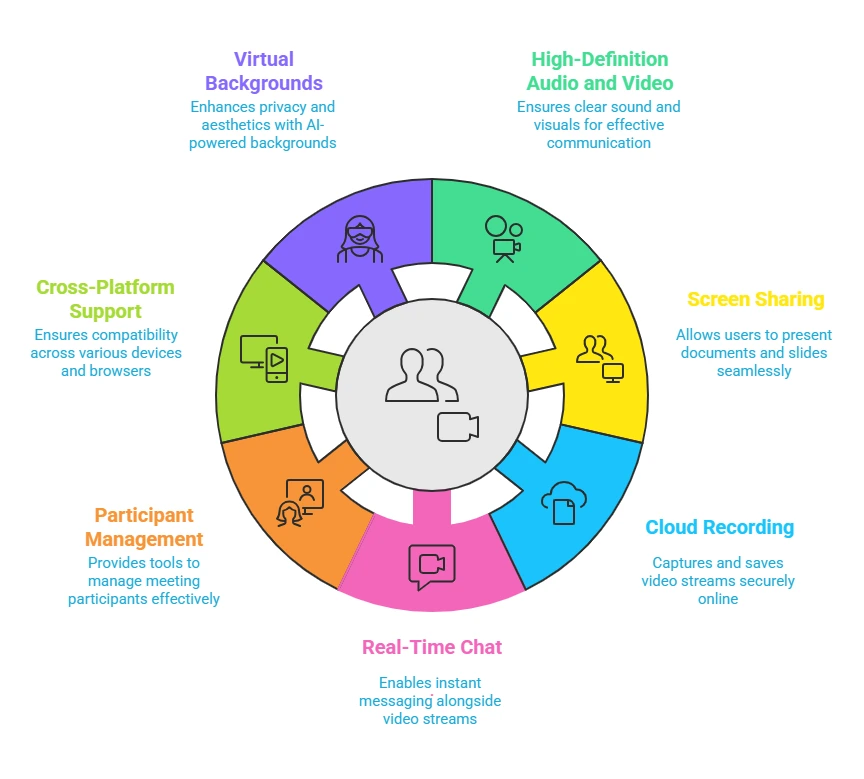
    7 Core Features of Video Conferencing API

    When you use a virtual meeting api or a group video call api, you are getting a complete set of tools to make the meeting useful and interactive. Here are the essential features included in most standard packages:

    • High-Definition Audio and Video capabilities: This module automatically handles the complex work of capturing and delivering crystal-clear sound and visuals. It manages the data compression so that developers do not have to write code for processing millions of pixels.
    • Screen Sharing capabilities: This feature provides a ready-made tool that captures exactly what is on a user’s computer screen and broadcasts it to others. Developers can simply switch this function on to let users present documents or slides. This eliminates the need to build a complex screen capture engine yourself.
    • Cloud Recording capabilities: The API includes a recording system that captures the video stream and saves it directly to a secure online server. This allows developers to offer playback functionality to users immediately after a meeting ends. It removes the burden of managing massive storage hard drives for your own company.
    • Real-Time Chat capabilities: This bundle adds a text messaging layer that runs perfectly alongside the video stream. It provides the infrastructure to send instant messages, emojis, or links without interrupting the conversation. This ensures that the real-time communication api functions seamlessly on two channels at once.
    • Participant Management capabilities: This set of controls gives the host the power to manage the people in the room. It provides the pre-written logic needed to mute noisy microphones or remove unwanted guests. Developers can use these commands to easily build an admin panel for meeting hosts.
    • Cross-Platform Support capabilities: Whether you use a mobile video sdk or a browser video api, this capability ensures that the video code works on every device, from phones to web browsers. The API library contains the specific instructions for each operating system. This allows the developer to write the code just once and have it run everywhere.
    • Virtual Backgrounds capabilities: This advanced module uses artificial intelligence to distinguish the user from their surroundings. It allows developers to add features like background blurring or image replacement with a single command. This helps users maintain privacy without the developer needing to become an expert in computer vision.

    Why Business Use Video Conferencing API?

    Here are the main reasons people choose an api for video conferencing instead of building it themselves.

    1) It Saves Development Time

    If a company decides to build its own video engine, it can take a year or more to complete. This is because they have to write millions of lines of complex code. By using webrtc integration, developers can skip this entire building phase.They can simply plug the finished technology into their app. This allows them to launch their product in weeks instead of years. Today, even Chatgpt users are leveraging such APIs to quickly build and test real-time communication features without starting from scratch.

    2) It Reduces Upfront Costs

    Building video infrastructure requires expensive physical servers. You have to buy powerful computers to process the video data. You also have to pay to keep them running twenty-four hours a day, even if no one is making a call. With an API, you do not buy any servers. You usually pay a small fee only for the minutes of video you actually use.

    3) It Solves Complex Technical Problems

    Video data is very heavy and difficult to move. It often gets stuck when internet connections are weak or when firewalls block it. An API provider has already solved these difficult problems. They have built a global network of servers that ensures the live video api flows smoothly. A regular company would struggle to build a network this reliable on its own.

    4) It Handles Maintenance and Updates

    Technology changes very fast. New phones come out every year, and web browsers update constantly. Every time this happens, the video code might break. If you build it yourself, your team has to constantly fix these breaks. When you use an API, the provider fixes them for you. You get the updates automatically without doing any extra work.

    5) It Scales Instantly

    When an app becomes popular, thousands of people might try to use it at the same time. If you built the system yourself, your servers might crash under the pressure. An API handles this pressure for you. It can support two people or two million people instantly without you needing to change anything.

    Should I be Using Video Conferencing API in my Business?

    Absolutely! You should use an embed video api to add one of the best video calling solutions to your software immediately. This allows you to add professional video features while keeping your team focused on your actual product.

    Building video technology from scratch is incredibly complex and expensive, often distracting developers from their primary goals for months or even years. By using an API, you offload all the difficult technical responsibilities like security and connection stability to experts who manage it for you.

    This approach helps you create a custom video conferencing app where you can design a custom video call layout that perfectly matches your brand identity. Ultimately, it provides the fastest path to launching a reliable and high-quality application without the heavy financial risk of developing the infrastructure yourself.

    How to Get Started With Video Conferencing API Today?

    Integrating a video system might sound like a massive engineering project, but the process is actually quite standardized. Here is the practical path to getting started.

    1) Select your Video Conferencing API provider

    The first step is to choose the company that will power your video infrastructure. You have many options ranging from large global companies to specialized video meeting software api platforms. You should look for a provider that offers good documentation and a pricing model that fits your budget.

    2) Get your API credentials:

    Once you choose a provider, you will sign up for a developer account on their website. After you register, the system will generate a set of unique digital keys for you. These keys act like a secure password that allows your specific application to talk to their cloud servers.

    3) Install the software development kit:

    You do not need to write the complex code for video transmission yourself. Instead, you will download a pre-made package of code called an SDK from your provider. This package contains all the difficult engineering work already finished and ready for you to use. You simply install this package into your application’s code base.

    4) Initialize the video engine

    With the kit installed, your developer will write a few lines of code to start the video engine. This step usually involves telling the app to use your unique API keys to authenticate itself. It establishes the connection between your user’s device and the provider’s network.

    5) Create a digital room

    The core concept of a video meeting api is the room. You will write a simple command that tells the API to create a unique digital space. This is the virtual meeting place where your users will connect with each other.

    6) Run your first test

    The final step is to run the application and test the connection. You can open your app on two different devices and have them join the room you just created. If you see video and hear audio on both ends, your video conference integration is successful.

    How Difficult is to Integrate a Video API in Software?

    Integrating a Video Conferencing API is designed to be a manageable task for any competent developer.

    The process does not require them to be an expert in video engineering. Providers like inAPI supply a complete set of tools known as a Software Development Kit. This kit contains the complex code needed to handle video streams so the developer does not have to write it.

    The developer simply installs this package into their existing application. They then use secure access keys to link their software to the provider’s cloud system. Because the difficult backend infrastructure is already working, a basic integration can often be completed in a few hours. For more complex implementations, businesses can also work with an AI software development company to identify opportunities for adding intelligent features alongside video capabilities. This also highlights how modern tools continue to simplify development, despite ongoing discussions around is web development dying.

    How Fast Can You Build an App With Video API?

    Using a Video Conferencing API drastically reduces the time it takes to launch your application. If your team tried to build a reliable video system from scratch, it would likely take them many months or even over a year of complex engineering work. By using an API, you skip this entire development phase because the heavy lifting is already done for you. Your developers simply plug the ready-made video features into your app instead of inventing them. This efficient process allows you to finish a project in just a few weeks instead of waiting a year.

    How Much It Cost to Use a Video Conferencing API?

    Most video conferencing APIs operate on a business model known as Software as a Service. This means you do not have to purchase expensive physical infrastructure or servers to get started. Instead, you usually pay a fee based on how much you actually use the software. The providers track the activity on your application and bill you accordingly. This allows your costs to stay low when you are small and scale up only as your business needs grow. This flexibility prevents you from wasting money on resources you are not currently using.

    Integrate All Video Features In Your Software With inAPI

    If you are looking for a video conferencing API provider who can help you build your application, you should consider using inAPI by InstaVC. This is a cloud based video call api that allows businesses to add video communication api features directly to their own websites or apps. It acts like a bridge that connects your software to their powerful video technology.

    inAPI is a remote meeting api that provides a video conference api for apps that developers can plug straight into your code. You do not need to build the video technology yourself. Because it is hosted on the cloud, you can access it over the internet and start using it right away without buying physical servers.

    You can start using inAPI today to transform your software. Contact our team now to request your access keys and see how easy it is to get started.

    FAQ

    FAQ
    What is a Video Conferencing API?

    A Video Conferencing API is a pre-made software tool that lets you add video calling features to your app or website. It acts like a digital building block so developers do not have to build the technology from scratch. This allows you to launch video applications much faster.

    How does a Video Conferencing API work?

    The API creates a secure digital connection between two devices over the internet. It shrinks large video files into small data bundles so they can travel quickly without freezing. It also keeps the audio and video perfectly synchronized so the sound matches the image.

    What are the key features of a Video Conferencing API?

    Most APIs come with essential tools like high-definition video, screen sharing, and real-time chat. They also include features for recording meetings and managing participants, such as muting microphones.

    What is the difference between a Video API and a Video SDK?

    The API is the engine that handles the connection and data transfer behind the scenes. The SDK, or Software Development Kit, is the package of code and tools you actually download and install to build the features.

    How secure are Video Conferencing APIs?

    These APIs are very secure because they create a private digital tunnel for every call. The provider manages complex security tasks to ensure that only invited guests can join the meeting.

    Can I integrate a Video Conferencing API into mobile and web applications?

    Yes, these APIs are built to work smoothly on both mobile apps and web browsers. They contain specific code that allows the video to function on phones, tablets, and computers. This ensures your users can join a call from any device they prefer.

    How do I choose the right Video Conferencing API for my needs?

    You should look for a provider that offers clear documentation and a pricing model that fits your budget. Make sure they offer the specific features you need, such as recording or screen sharing. It is also smart to test their connection quality before you commit.